Beranda · · · ·

New Registry Entry for Anti-Virus Programs to Scan When you open attachments By Patricbensen

scan3

This is one of the most interesting topic that I came across while looking for the registry policy for Internet Explorer Icon – not the hack version by http://patricbensen.blogspot.com /2007/11/winbubbles-features-gap.html" target="_blank">WinBubble.

Anyway, I’m going to post some screenshots of Microsoft Security Essentials in this guide, not because I’m a fan of MS Windows, but for the reason that in my experience - it is effective in detecting malicious viruses that you came across every single day.

According to MS, the registry policy lets you manage the behavior for sending messages to registered antivirus programs to scan files that you download by using Internet Explorer or by using Microsoft Outlook Express before you open the files. If multiple programs are registered, they will all be notified.

Note

If the antivirus program fails, the attachment file is blocked from being opened. If you do not configure this policy, Windows does not call the registered antivirus programs when file attachments are opened.

Configuring the Group Policy using the Windows Registry

Launch regedit.exe or Registry Editor using the Start Menu Search and go to this Registry Subkey location

HKEY_CURRENT_USER\SOFTWARE\Microsoft\Windows\CurrentVersion\Policies\Attachments

If the registry subkey doesn’t exist, Create a New Key: Use the Right-Click of the Policies folder – New – Key

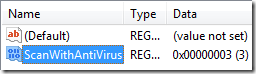
Create a folder named Attachments and inside the folder, Right-Click any space,  New – DWORD (32-Bit) Value and use the “ScanWithAntiVirus” name.

ScanWithAntiVirus Registry Name
scanwithantivirus

By default, the Group Policy setting is set to Off - registry value of the ScanWithAntiVirus registry entry is 1. When the value is set to 3, the policy is On.

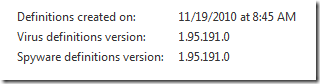
Just make sure that your virus definition is always updated
virusdefinition

Works with Windows XP Professional and above – checked with Windows Vista.


Thanks for Reading the article!
 

New Changing Internet Explorer Welcome Tab URL By Patricbensen

Once upon a time, a malicious trojan invaded my computer and automatically sets registry values to Internet Explorer and every time you open a tab, www.114116.info opens.

ntab


Anyway, too good to be true.

The malicious code gave me an idea to tweak Internet Explorer Tabs with my own url address!

For example, I want to have a custom address like Google or Yahoo every time I click the new Tab. Great idea Right?!

Custom IE Tab URL Address

Launch regedit.exe or Registry Editor using the Start Menu Search or Run Window (Win Key + R) and go to this location

HKEY_LOCAL_MACHINE\SOFTWARE\Microsoft\Internet Explorer\AboutURLs

locate the “tabs” value name, and change the value to whatever web address that you want e.g. http://mail.yahoo.com

registry

If the registry hack doesn’t work, try the user registry hive

HKEY_CURRENT_USER\Software\Microsoft\Internet Explorer\AboutURLs


Thanks for reading the article!

New [Registry Fix] File not Found message with Web Browser Control By Patricbensen

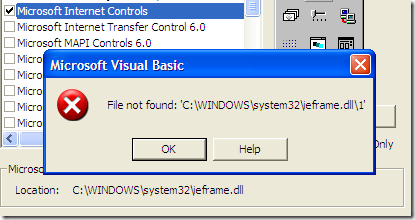
If your a developer, too busy with your work and you’ve encountered this message when your adding a Browser Functionality to your application. Here’s a quick fix and steps that you need in order to solve the problem easily.

filenotfound

What is a WebBrowser Control?

The WebBrowser or simply Internet Explorer Control adds browsing, document or data viewing, and downloading capabilities to your created Windows applications using Visual Basic 6, and Visual Studio .Net. Softwares created that uses this control will allow the user to browse sites on the Internet's World Wide Web, ftp, as well as folders in the local file system and on a network.

It maintains a history list that allows the user to browse forward and backward through previously browsed sites.

Quick and easy Solution

  • Launch the Registry Editor (regedit.exe) using the Start Menu Search or the Run Window (Windows Key + R)
  • Press Ctrl + F for search, and type “ieframe.dll\1”

find

Usually, This is the location of the value in the registry

HKEY_CLASSES_ROOT\TypeLib\{EAB22AC0-30C1-11CF-A7EB-0000C05BAE0B}

HKEY_CLASSES_ROOT\TypeLib\{EAB22AC0-30C1-11CF-A7EB-0000C05BAE0B}\1.1\0\win32

Fix the problem by changing the default value to  “ieframe.dll” only

ieframe

Thanks for reading the article!

New Free Proxy Servers - Anonymous Web Surfing - Unblock Websites By Patricbensen

http://patricbensen.blogspot.com/">patricbensen.blogspot.com
http://maspireinfosystems.com/images/free-web-proxy-server.png

Learn About Free Proxy Servers, How to Unblock Websites, Surf Anonymously


Perhaps you are blocked from visiting MySpace or Facebook at work. Maybe you just want to make sure that you won't be a victim of identity theft. Or you might want to check out your bank balance at an Internet cafe - and don't want anyone to know your account or your password.

Whatever your reason - unblocking websites, protecting your identity, or surfing anonymously, free proxy servers can accomplish all of these tasks for you.

Learn where to find free proxy sites, how to use them, and their benefits here at our page dedicated to free proxy servers.
 
A lot of people are scared and concerned about their anonymity online. With many cyber criminals just waiting to steal your identity - including your personal details such as credit card numbers, one has to be a little more careful when surfing on the Internet.

It is even more crucial when you are using a public computer to view personal information. For example, if you were to go to an Internet cafe checking your bank account information, the next person to use the computer could potentially access your banking information.

But, if you use a proxy server, none of your sensitve information is stored on the computer that you are sitting at, ensuring that all your sensitive and personal information remains safe and secure.

Why Use A Free Proxy Server? 

Free proxy servers protect your identity online

“Protect yourself from identity theft with a free proxy website when using public computers”

The Truth About Public Computers 

Ask yourself this: is there any privacy in public?

Alright, let me shatter some myths for you.

Most Internet cafés claim that they are safe places for you to surf the Internet. The one thing that they don't do is tell you how to protect your sensitive information.

The biggest problem is that computers store cookies which have information about the sites you visit and these sites may save a cookie when you enter the password.

This can translate into a problem if you forget to delete the cookies and history when you logoff the public computer that you are using. If you do forget, there is the possibility that the next user could access that information and use it to gain access to the sites you visited while at the public computer.

So are public computers private and safe?

Neither.

Unless you know the precautions you need to take to erase your tracks (or use a free proxy server), don't visit any sites that you have to login to access them (think e-mail and membership sites) and don't visit any of your banking sites while on a public computer.

Try These Free Proxy Websites 

Safe, Secure, Anonymous Proxy Servers

Do you worry about your anonymity online? Or are you blocked from your favorite website at work or school? Try some of these proxy websites.
Free Proxy Server
This free proxy server has one cool design. This is a web proxy that allows you to unblock MySpace, unblock Facebook, and more.
Bypass School Filter
Designed primarily to be used at school you can use Bypass School Filter to visit MySpace, Facebook, Bebo, Orkut and more.
MySpace Proxy
Perhaps one of the most commmonly blocked websites online is MySpace. Unblock MySpace with this fast and beautifully desined site.
Orkut Proxy
Orkut is another social networking site that is typically blocked at work. Enjoy the speed and privacy provided by our Orkut inspired web proxy.
Free Proxy Website
Brand new free proxy website that will allow you to visit My Space, Facebook, Orkut, and all of the other favorite websites that you love.

Have you used free proxy servers? 

Share your experiences with anonymous web surfing.

I know that a lot of you have never heard of free proxy servers before - but a lot of you have. Share your experiences (good and bad) with free proxy servers, anonymous surfing, and identity theft.

New How to delete Virtual CD/DVD ROM Drive from My Computer By Patricbensen

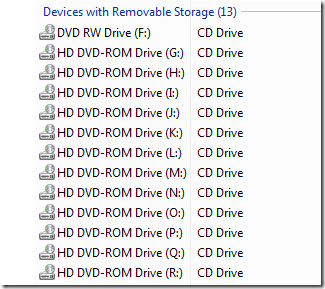
duplicate

Mysterious Extra Virtual HD DVD-ROM Drive because of installation of Virtual Drive Software such as Daemon tools, Magic Disk and Virtual Clone Drive? or maybe previously removed, now non-existent CD-ROM drive… These are some simple problems that we can encounter everyday in using Windows.

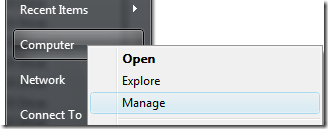
Open the Device Manager

manage

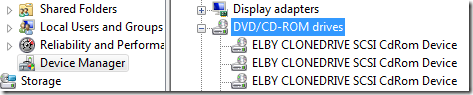
Click the Virtual Driver, and select the device

devicemanager

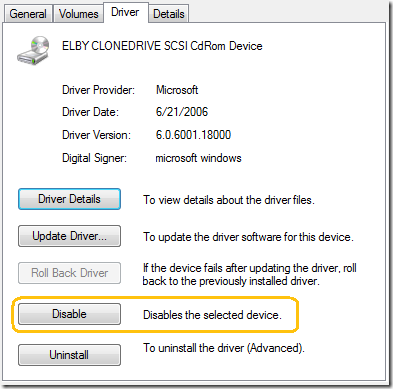
Go to the Properties and Disable the Selected Device

disable

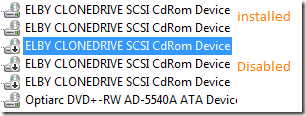
Result

disabledicon

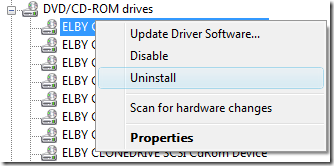
Uninstalling the Driver

If you want to remove them permanently - the uninstall option is the quickest way to solve the problem.

uninstall

That's it. Thank you for reading the article and have a great day!

New WiMAX- A NEW REVOLUTION IN WIRELESS INTERNET By Patricbensen

http://areacellphone.com/wp-content/uploads/2010/05/wimax.jpg

http://patricbensen.blogspot.com/">patricbensen.blogspot.com

WiMAX is the latest technology in the field of wireless internet. In fact it is the only available technology which enables broadband in wireless internet. WiMAX is the acronym for worldwide interoperability for microwave access. To phrase in simple words, WiMAX enables the users to access high speed internet with extreme mobility. This technology has several benefits when compared with existing WiFi technology. WiMAX uses microwave as a medium for data transfer which means a tower similar to the cell phone tower is used. Due to the use of microwaves, for a range of thirty miles, the data transfer rate can be nearly 75 MBPS. This would enable high speed internet access to more than 1000 computers from a single tower. The major advantages of WiMAX are, rural areas will be able to access broadband internet very easily at a much cheaper rate, Setting up internet access for the whole city can be completed within a couple of days. This would mean that in the near future we would be able to access the internet as if we are using the cell phones. It is possible to get hooked to the net from almost anyplace in the world.

Network scale
The smallest-scale network possible is a personal area network (PAN). A PAN allows devices to communicate with each other over short distances. Bluetooth is the best example of a PAN. A local area network (LAN) can also be easily setup. A LAN allows devices to share information, but is limited to a fairly small central area, such as a company's headquarters, a coffee shop or your house. Many LANs use WiFi to connect the network wirelessly. 

WiMAX is the wireless solution for the next step up in scale, the metropolitan area network (MAN). A MAN allows large areas to be connected, i.e. the size of a city can be connected very easily.
http://hzh3.com/wp-content/uploads/2009/06/060809_wimax.gif

GET READY TO ENJOY HI-SPEED WIRELESS BROADBAND CONNECTION AT A MINIMAL COST