New Google introduce Google phone By Patricbensen
New Newly introduced Vuzix iWear for the Gamers and the Movie Fanatics By Patricbensen
New Latest technology: Visual Memory By Patricbensen
http://patricbensen.blogspot.com/">patricbensen.blogspot.com
New Latest Technology Gadgets Martin Jetpack: Fly at 63MPH By Patricbensen
New Android OS 2.1 Tablet: Disgo Tablet 6000 By Patricbensen
- Ultra thing body of 14.6mm
- Touch screen Multi function
- Operating system Android 2.1
- Pre loaded applications can be easily use
- Easy view of Facebook, Youtube, Twitter & the email
- Easy access to the thousands of the free downloadable applications
- Screen resolution: 800 x 480 with full touch 7” High resolution TFT
- Built in two speaker of 0.5 W
- Rechargeable Polymer Battery of 1500mAh
- Flash user interface
- 2D/3D Graphic Accelerator
- Multiple audio, video and image files supports
- Ports: Mini USB x 1, MicroSD card slot x (upto 32GB), OTG x 1, Earphone Jack x 1 (2.5mm), DC Jack x 1, HDMI x 1
- Format Decoder: Full HD (1920 x 1080)
- H 264 upto 1080 P resolutions
- H 263 upto D1 resolution
- VCI upto 1080 p resolutions
- DIVX4/5/6/upto 1080 resolution
- MPEG2 main profile upto 1080p
- Supported file format : Audio: MP3/ WAV/WMA/ACC, ACC+
- Video format: HD support/ MP4 SP/ AVI (XVID, H.264, DIVX)/ 3GP
- Image support: JPEG, GIF, PNG, BMP
- CERTIFIED: CE/ WEEE/ROHS
New Electronic wrist watch with a mobile phone By Patricbensen
New Internet TV:Sony Google TV HDTVs By Patricbensen
New ION Technologies Biometric Security Flash Drive in 2010 By Patricbensen
New Cool Computer Gadgets By Patricbensen
Gadgets are those technological objects, being them devices or objects using devices. They have particular functions and that's why they are considered smarter than the normal technological objects. Gadgets can be divided in several types as Mechanical Gadgets (e.g. watches, bicycle), Electronic Gadgets (printers, mobile phones, TVs), Programmable Gadgets and Application Gadgets (Google Map, GPS).
The Gadgets actually express an innovative idea, of doing unusual activities, activities which are mostly used to facilitate some jobs or ways to do things.
Nowadays, people are fascinated by the technology and its fast forwarding mode, because many of the technology's ideas help them in several activities or help them just having fun.
Did you ever in the summer, while you were at work, thought about a cold cold juice or cold water or whatever drinks refreshes you? Of course you were sitting at your computer, with no mood to work because it's too hot in there, and near you there is no fridge and of course your launch break is finished. Well, welcome in the modern Era. I present you the FRIDGE for USB.
It has an USB Cable through which you can connect the USB Fridge to your computer. The fridge starts to work and your can of Cola will be cold as ice.
Further more, I will give you examples of cool computer gadgets and through this maybe I'll give you some ideas of gifts.
The Flexible USB LED Light is made to be used by Laptops and Notebooks and it's perfect when you are having room mates, and you don't want to disturb them with the light from your room. You connect the lamp to the Laptop through the USB Cable, and the light will be just for you and your room mates will be graceful because you let them have a good sleep.
Smart E Bear is perfect when your kids are having too much energy, or if you don't have time for them. The Smart E Bear is an incredible Teddy Bear, which, when connected to computer (through USB cable) is runs a program that has in its memory lots of story and songs for your kinds. It can also talk to the kids by saying their names (it has more than 1000 of names in its database). All you have to do is to tell the Teddy bear what to do, and it can be the perfect nanny.
CanCam is perfect for you if you want to find out who is entering your office or record things that happens when you are not present in a specific place. It is a spy camera which records voices and images just if you connect it to a computer using the USB cable.
It is absolutely perfect because no one will actually notice that it is a spy cam, because it has the shape of a Coca-Cola Can, unless someone may want to drink a glass of Cola.
Are you tired of buying hundreds of pens and when you need pen, you never have one? Now is time for revenge and teach people to use their own pen. The Shocking Pen can be a source of fun but it is also the pen that will be yours forever.
If a person comes in your office, and tries to take in hand the pen, that person will have some shocks from the pen and its special circuits , and will leave alone your pen forever. In this way, you don't need to buy anymore lots of pens. Well, unfortunately this pen has no ink to write as it's just a joke, but they will teach your colleagues that should not take what does not belong to them.
New HereAfter PC By Patricbensen
New PS3 Slim By Patricbensen
On the back of the Sony PS3 Slim you shall find an Ethernet port, one HDMI out, a proprietary AV output and an optical digital audio output. When you buy the PS3 Slim, you will get an AV cable which is shipped together with the unit. One aspect that may disappoint people is the fact that the PS3 Slim does not come with any additional features from its predecessors. An IR receiver would have been nice. The truth is that when it comes to this gaming console, everything is pretty much focused on design.
New Cool Gadget Goggles By Patricbensen
New Apple 3G iPhone By Patricbensen
New What Accessibility Improvements does Gingerbread include? By Patricbensen
Dear users,
The Gingerbread release of the Android platform has introduced the following accessibility related features:
1. The Calendar application has been instrumented to fire the appropriate accessibility events. which consumed by a screen reader such as Spiel or TalkBack turn the application into a fully accessible Calendar solution.
2. Accessibility tests have been added to the Compatibility Test Suite (CTS) to ensure that every Android compatible device does support the latest version of the platform accessibility APIs. This means that Android compatible devices will have the same accessibility features as the current version of the platform. Among other things, the tests ensure that the user settings to enable accessibility are present. Note that this test suite is not responsible for assessing the accessibility level of the applications running on Android devices.
3. A much more recent version of TalkBack is included out-of-the-box.
Thanks!
Svetoslav Ganov
New Windows Update Registry Hacks By Patricbensen
Updates are additions to software that can prevent or fix problems in the future, enhance security, improve the computer performance and stability. It is free of charge as part of maintenance and support services for your Windows computer.
Remove or Disable Windows Update through Start Menu Power Button and Shutdown Dialog Window
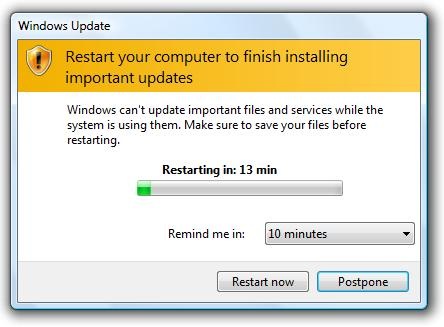
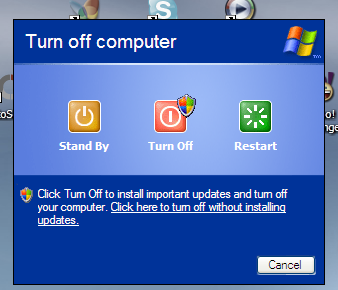
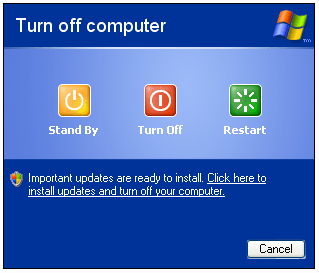
Get annoyed with Windows update changing the sleep/shutdown to “Install Updates and Shutdown”?
Stop Windows Update from hijacking your computer! Open your Registry Editor (regedit.exe) and go to this registry location
HKEY_CURRENT_USER\Software\Policies\Microsoft
If you can’t find Windows\WindowsUpdate\AU Registry Keys, create one by using the Right-Click portion of your Mouse > New > Key Sub-menu
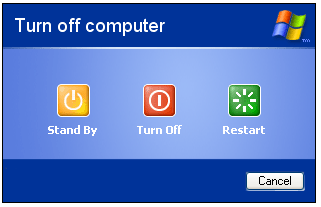
Removing the Windows Update as Default Option
Create New Registry Value name NoAUAsDefaultShutdownOption with a value of 1
Windows XP Results
Windows Vista and 7…
If you want to get rid of the entire option, create a registry dword value name NoAUShutdownOption with a value of 1
Disable Force Auto Update Reboot while Logged On
Is Windows Update restarting your system unexpectively? Create a registry dword value name NoAutoRebootWithLoggedOnUsers with a value of 1
Prohibits Windows from searching for updates
Registry Location
HKEY_LOCAL_MACHINE\SOFTWARE\Policies\Microsoft\Windows\WindowsUpdate\AU
Create a registry value name NoAutoUpdate with a value of 1
Result
Automatic Windows Update Search is Enabled
Allow Automatic Updates immediate installation
“Automatic installation of certain updates that neither interrupt Windows services nor restart Windows”
Create a registry name AutoInstallMinorUpdates with value of 1 to silently install minor updates.
Note
You can remove some updates, but not updates that affect important operating system files. You should only remove an update if you’re sure that it’s causing the problem through Add or Remove Programs (XP) and Program and Features (newer version of Windows).
That’s it! Hope this tip saves you a lot of time for fixing your computer problems…
Source(s)