Sudhanwa Chavan has created a pen-size concept cell phone named as i-Roll. This cell phone uses can be rolled up to save the space because of its scroll-like design. i-Roll features an OLED touchscreen that provide all necessary functionalities, and when this retracted touchscreen is idle, it will fold back inside a central column.
The outer casing of i-Roll is also made up of an OLED surface that will display important notifications like incoming calls, emails, or messages. The battery status will be indicated by different colors of the battery’s column.
The other prominent features of i-Roll are: 360-degree rotating camera, instant USB connectivity, extended Bluetooth with expandable memory stick, and 3G services compatibility.
Damage of Fukushima Daiichi nuclear plant because of earthquake forces Japanese to reduce their power usage to 15 percent, therefore to overcome this power shortage a Japanese company Kuchofuku Co. Ltd is aiming to create air-conditioned clothes that help the wearer to remain cool in summer without any external source.
Air-conditioned clothes will consist of two electric fans that can be controlled by the wearer to change the speed of the fans. These high-tech clothes will be a great relief for the employees working at the hot construction sites like automobile giants, steelmakers, food companies and construction firms.
Polaroid Instant 3X4 Mobile Printer provides the solution of instant printing from your mobile phone or digital camera. This portable printer can print off 3” x 4” images in a matter of seconds, and it compatible with mostly mobile devices.
It allows printing via Bluetooth or USB cable in no time. The best feature of this gadget is automatic image quality optimization with water-resistant, other features are: tear-proof, smudge-proof and peel-off prints.
Polaroid Instant 3X4 Mobile Printer uses a special paper, this paper already has the colors imbedded in them, and so there is no worry of ink shortage unlike the common printers. The color activation by the printer is done via heat using ZINK technology. The cost of this 2-pounds printer is $170.
On 8th of July NASA space shuttle reached his 30th anniversary by blasting off for his 135th and last mission "STS-135 launch of Atlantis”. Four astronauts - Chris Ferguson, Doug Hurley, Rex Walheim and Sandy Magnus are taking the part in this 12-day mission. After his last flight, space shuttle will become a part of the museum and serve their rest of life as a showpiece on public display.
Check out the top 10 facts of NASA space shuttle to relive its history:
1) Too Fast
Space shuttle has a speed of about 17,500 miles (28,000 kilometers) per hour while traveling in the orbit. This speed enables the crew to see a sunrise or sunset every 45 minutes.
2) Height and Weight
The Statue of Liberty and the space shuttle share the same height, but space shuttle weight is approximately three times more than the Statue of Liberty.
3) Traveled Distance
The space shuttle almost travels 1.3 times the distance between Earth and Jupiter that is 513.7 million miles (826.7 million km).
4) Food
The food for astronauts in the Space Shuttle is consisting of: peanut butter, fresh fruits and vegetables, chicken, beef, and spaghetti. This food is packed in special packing that saves the food to fly from flying in the space.
5) Accidents
Space shuttle suffered two deadly accidents in which 14 astronauts and 2 orbiters were killed.
6) Cost
The cost of a single space shuttle flight is about $1.45 billion, and it was the main reason that forced the NASA to make 9 flights a year instead of 50 flights.
7) Engine
Space shuttle’s engine has a horsepower of as much as 39 train engines horsepower, but its weight is about one-seventh of a train engine.
8) Longest Stay
Columbia has a record of longest stay in the space with 17 days in 1996. But, unfortunately it was destroyed in 2003 during its flight number 28th.
9) Heat Shield
The heat shield of space shuttle contains more than 30,000 tiles that are constructed essentially of sand. Heat shield also known as Thermal Protection System.
10) Tweeting from Space
Astronaut Michael J. Massimino who was the member of the space shuttle Atlantis’ STS-125 mission tweeted from the space and became the first person to use the Twitter in space.
His status was "From orbit: Launch was awesome!! I am feeling great, working hard, & enjoying the magnificent views, the adventure of a lifetime has begun!" (@Astro_Mike)
Whenever you are in hurry and have missed your shave then you may take help from Carzor, which is a handy razor that lets you to make a shave even when you are traveling.
This amazing razor comes with a mirror so you are free to enjoy on-the-go shaving through it. When you fullfil your purpose then you can fold Crazor and it will take the shape of a credit card so can be fit readily into your wallet. Don’t forget to remove the blades before folding it otherwise they will cut your money. The good thing is that you are free to choose any scent, lemon, wood, and mint, ocean or orange aromas ,which you want for glide strip on Carzor.
Want to buy Carzor Credit Card Razor? Just spend $17 at Infemtry.
Browsing the internet through mobile phones are constantly moving to a world of connectivity, function-wise and mobility. Several years before, the feature is only applicable to high-end phones, today, it became less-expensive, larger screen and thinner.
Search is usually needed for information query, its accessibility increases than before for smartphones - here’s a quick tip on how to use Google Mobile client using Windows PC.
Many Times, it happens that you missed your TV favorite program because of your lost remote control. However it will not happen again when you have Pillow Remote Control with you. This remote not only provide you a great control of your TV but also allow you to get relaxed for sometime by heading down on it.
You can get this soft and fluffy remote control only for $40. You can use it for relaxation purpose on sofa however when you want to use it for normal functional then first tap "active" button and then start using it for setting the volume or flipping the channels.
John A. Rogers , who is a professor of materials science at the University of Illinois at Urbana-Champaign, has developed a flexible electronic device known as electronic tattoo that make it feasible for the doctors to monitor the heart, brain, and muscle activity of the patient. This new ultra-thin electronics resembled to a tattoo which can stick to skin for sometime and during this time doctor can diagnose and monitor the health condition of the patient.
Actually, Rogers was trying to make a flexible device that can replicate the bulky electrocardiograms and some other monitoring machines and for this purpose he did some research. He made a device that is composed of incredibly thin silicon which can be deformed without breaking.
This electronic tattoo has electrodes which help the doctors in measuring the electric signals produced by muscles and brain. This tattoo doesn’t cause any irritation so a person can wear it for long time. It also has built in LED for visual feedback. According to Rogers, this device has a potential to work as human-computer interface
First unveiled online a few months ago, I'm Watch is a smartphone-compatible wristwatch, designed to work with Android-based cell phones - although it's reportedly also compatible with iOS devices. It is being developed by an Italian producer, and is currently available for pre-order. Initially the price tag was very high, but it is now being offered in a cheaper, colored version called I'm Color. The watch is scheduled to be released this October.
The I'm Watch website showcases two versions of the product. I'm Jewel is a luxury version, designed with precious materials (titanium, gold) and jewels (diamonds), with prices ranging from EUR599 to EUR11,999 (US$840 - $16,833). The I'm Color collection is priced at EUR249 (US$349), however, you'd need to pay 20 percent of the price in advance to have your order secured. The current offer will last until July 18, according to the website.
The company behind I'm Watch is Milan-based Blue Sky s.r.l. Some of the features of the device include the following:
iPhone 4 and Android smartphone connectivity via Bluetooth
It will allow users to make calls and receive calls, text messages, and e-mails
Users will be able to use its speakerphone for hands-free phone calls
Via its touchscreen, users will be able to view Facebook, Twitter and Foursquare notifications, as well as a photo gallery
Exclusive apps will be available for download via the "I'm Store" and music via "I'music"
Specs include: 1.54'' 240x240 pixel color TFT display, 4GB of built-in storage, 64MB of RAM, Bluetooth 2.1 + EDR support, Li-Po 600 mAh battery
The I'm Watch seems to still be some distance from completion, and its description is rather brief at the moment. Shipping is nonetheless set to begin October 31.
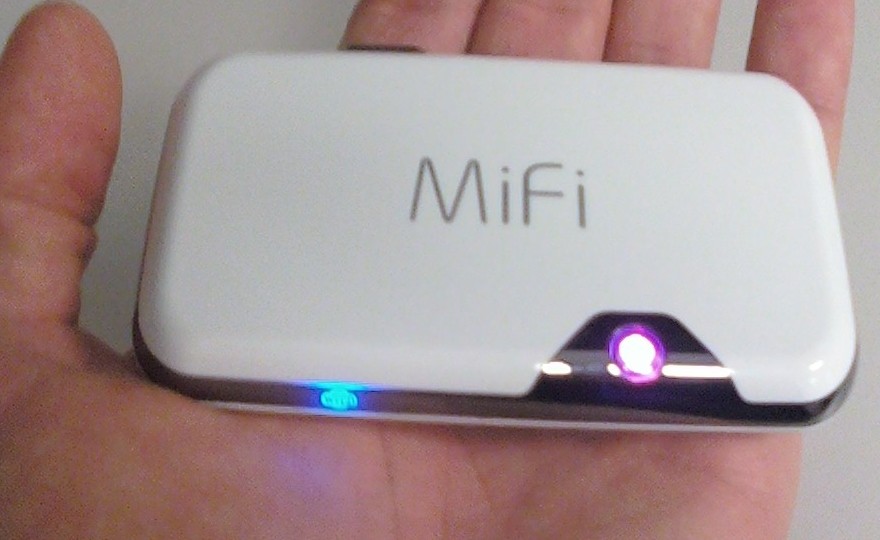
MiFi is a line of compact wireless routers produced by Novatel Wireless that act as mobile Wi-Fi hotspots. MiFi stands for 'My Wi-Fi'. The MiFi can be connected to a mobile phone (cellular) carrier and provide internet access for up to 5 devices. The MiFi works at a distance up to 10 m (30 ft) and will provide internet or network access to any WiFi enabled peripheral device.
The first MiFi device was introduced in the U.S. in May 2009 by Novatel Wireless,and Novatel owns a registered trademark on the "MiFi" brand name in the U.S. The Novatel MiFi is also marketed as such in the Netherlands, Egypt, Spain, Portugal, Germany, Poland, Romania, Hungary, Slovenia, Qatar, Kuwait, Bahrain, New Zealand, Singapore, Thailand, Japan, South Africa, Puerto Rico, Canada, and Mexico. However, in the United Kingdom, mobile operator 3 owns the "MiFi" trademark and markets a similar device from Huawei under the name.
MiFi (and MiFi-like) devices
Novatel MiFi 2200
Limited to 5 Wi-Fi clients such as laptops, cameras, gaming devices and multimedia players; with the exception of manually editing the devices config file to allow more clients.
May be connected to a computer via a MicroUSB connection, though doing so disables the Wi-Fi networking, converting the device into a traditional single-client modem. (However, CNET has introduced a tweak to charge the device over USB while maintaining its functionality.)
Includes GPS unit, which is usable on some networks (Virgin) and not on others (Verizon).
Uses 3G data network (CDMA 1xEVDO RevA).
Novatel MiFi 23xx series
Same functionality as 2200, plus:
Accepts SD card for in-device shared media storage.
Uses 3G data network (MiFi 2352: HSUPA/HSDPA 900/1900/2100 MHz, MiFi 2372: HSUPA/HSDPA 850/1900/2100 MHz; both support GPRS/EDGE 850/900/1800/1900 MHz).
Novatel MiFi 33xx series
Same functionality as 23xx series, plus:
Linux-based MiFi OS with widgets:
Messages: perform SMS-based messaging actions such as reading, writing, sending and receiving SMS messages
Data Usage: track MiFi data usage in home and roaming networks
GeoSearch: leverage the GPS functionality of the MiFi to display a map of the local area, search the local area, display the search results on the map
Weather: fetch weather data for the current and defined locations
MiFi DLNA Server: start, stop and configure the MiFi DLNA server
4G MiFi devices
The Las Vegas Consumer Electronics Show 2011 saw the introduction of two new 4G capable MiFi devices from Novatel:
Verizon Wireless featured the 4510L model, which will connect to Verizon's new LTE 4G network, expected to support 5–12 Mbps download and 2–5 Mbit/s upload.
Sprint featured the MiFi 4082, a WiMAX version.
Both devices maintain backward compatibility with existing 3G networks. Other features include:
MiFiOS with widget support
MicroSD card slot
GPS receiver
4 hour battery life
Front panel status display using E Ink technology. The front panel display shows battery, signal strength and number of connected devices. The difficulty of viewing such information was seen as a major shortcoming of earlier MiFi devices.
Non-Novatel devices
Huawei E5830 (Series), E585, E586 with HSPA+ and Chinese market E5805 using CDMA2000 and ET536 using TD-SCDMA.
NetComm MyZone 3G24W
Option GlobeSurfer III
Sierra Wireless Overdrive (Note: 4G capable; available only in U.S. through Sprint)
D-Link DIR-457/MyPocket
Review: MiFi 4510L mobile hotspot for Verizon Wireless
We’ve covered a number of mobile hotspots in the past and they are basically all the same. Some of the better ones have displays or microSD card readers, but at the end of the day they don’t tend to vary much from one another. Typically things come down to two factors: carrier and price. It would be great to add speed and battery life to that list, but speed generally relies on carrier/reception and there isn’t much variation in battery life from one device to the next (especially if you are connecting multiple devices as once).
So if 3G mobile hotspots are more or less all the same, then the release of a 4G LTE model is certainly worth noting. After all a 4G phone is nice to have, but a laptop can benefit even more from the connection: it can better take advantage of the speeds and doesn’t have to worry about the battery-devastating properties of current LTE chips.
At $99 (with a 2-year agreement) the MiFi 4510L is in many ways a more attractive product than Verizon’s other 4G mobile broadband offerings. Most of those are USB modems, which means that they can only work with one USB-capable device at a time (the 4510L can work with up to five WiFi-enabled devices at once). And then there is the Samsung SCH-LC11, which has gotten good reviews but has some issues.
On the hardware side the 4510L is a bit thicker than some of the products we’ve seen in the past but it’s still completely pocketable. Thanks to a matte black back, glossy front, and metallic band around the top it’s a bit more attractive than the typical hotspot as well. There is no microSD card reader, but Novatel Wireless made up for that with two very cool hardware features. The first of these is an electronic paper display on the top that shows vital information like signal strength, battery life, and connected devices. The second perk is an external antenna connector, which is useful if you’d like to boost reception and/or use this as a home device. An antenna is not included.
Setup and connecting to the 451oL are both as easy as they are with a typical hotspot. To your computer the hotspot looks just like a router so you can get data from it as soon as it’s on and has a 4G or 3G connection is established. The MiFi uses 802.11 b/g/n so no bottleneck is created locally.
Speeds are, as with other Verizon LTE devices, excellent. Here are some samples from tests in downtown Manhattan…
Other tests taken in Manhattan were basically in line with these speeds, which is to say they were also quite good. There is a lot of variation based on reception so download speeds can vary from around 7Mbps to up to the 15Mbps seen above. So the speeds are great, well within the range of being used a full-time home connection if the data caps weren’t so severe and the overage pricing insanely high.
There is no question that the 4510L gets the job done. It’s a good device and it’s reasonably priced at $99… but it’s not the only 4G LTE mobile hotspot on Verizon. The Samsung SCH-LC11 is the same price, has a slimmer design, and (from what we hear) has a longer battery life than the 4510L. Because the the Mifi doesn’t use MiFi OS and it doesn’t even have GPS working the normal advantages of going with a Novatel product aren’t present, which makes Samsung’s upstart product a viable option. The MiFi also has the annoying quirk of not being able to transmit a signal while charging over USB, though this isn’t an issue when charging from an outlet.
Overall, if you are looking for a 4G mobile hotspot right now, this is the one to get. The Samsung SCH-LC11 has some advantages over it, but the consensus is that the MiFi is the way to go thanks to better features (like the electronic paper display). Plus, the people that tested them head-to-head found the MiFi to be more reliable. I had an excellent experience with this (aside from Verizon’s LTE outage) and my only hesitation would be its combination of excellent download speeds and Verizon’s bandwidth caps, but if you are careful with these you’ll be fine.
This week we’ve introduced a brand new product to our broadband range. It’s the first time it’s been launched in the UK, and it’s designed for the significant chunk of the population, especially renters and students, that have told us they want Wi-Fi at home, just without the phone line and the lengthy contract.
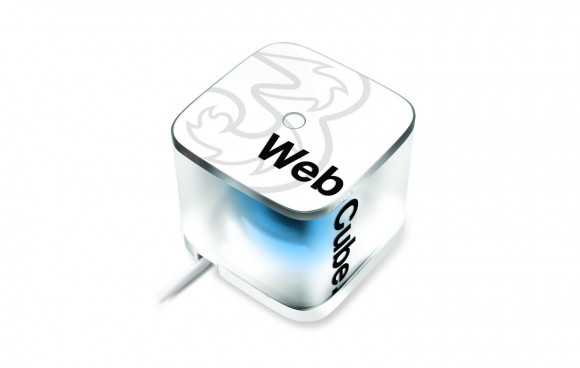
So we’ve designed Web Cube, and it’s something that we’re really excited about.
The Web Cube’s Wi-Fi signal is powered by our 3G network, so it comes ready-to-go with a mobile broadband SIM card. It’s really easy to set up – just plug it in, turn it on and connect using the name and password supplied in the box. You don’t need a phone line to get going, as long as it’s plugged into the mains and your SIM is inserted, our network will do the rest.
The Web Cube is HSPA+ enabled to the 21.1Mbps technical standard, to deliver typical download speeds of 2-5Mbps, comparable to those of entry-level fixed-line broadband solutions, with the potential to reach a maximum download speed in excess of 10Mbps. Up to five Wi-Fi enabled devices can be connected at any one time, including smartphones, laptops and tablets, and it has a range of up to 30 metres.
Because the Web Cube is brand new to the UK, before we take it nationwide we’ve chosen to launch in a few key cities first. We want to test the market, so we’ve gone to Leeds, Glasgow and Edinburgh, some of our most successful areas for Mobile Broadband, to kick things off.
We hope to be able to roll-out Web Cube nationwide very soon, so if you’re not in Glasgow, Edinburgh or Leeds but you’re still interested, you can register your details online and we’ll be in touch when we have more information.
In the meantime, if you manage to get your hands on one, or if you know someone who has one, we’d love to hear your feedback.
E Home concept is a two part series by designers Jeiyong Chun & Hyunjune Yang where they bring forth their ideas of maintaining a well balanced home environment with sufficient greenery to keep the atmosphere cheery and fresh.
Home, Green Home by Jeiyong Chun consists of a family of five modular units (two green towers, one green wall, one green floor and one green stand) that are sustained by SDPCS. In other words a Smart Digital Plant Care System nurtures the plants with the help of a digitally empowered environment.
Hyunjune Yang’s D’Nature is more about a digital walk in the park; I suppose this simulated greenery is more suitable to Google’s office than a house. The good thing about both the concepts is the inclusion of a green space, which is slowly diluting due to rapid urbanization.
Bluetooth allows electronic gadgets like handheld devices to communicate wirelessly. Its list of application ranges from communication between mobile phone and PCs like sending and receiving of files and wireless headset, Car stereo system for mobile phone, wireless control, input and output devices like mouse and keyboard and many more applications.
Configuring the options sometimes is very difficult. Let’s dig more about the topic.
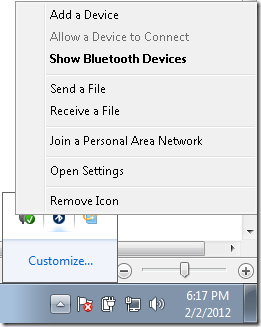
How to access all the settings and options through Bluetooth notification Icon
Add a Device
Allow a Device to Connect
Show Bluetooth Devices
Send a File
Receive a File
Join a Personal Area Network
Open Settings
Remove Icon
However if the icons are missing, try to restore the option using Taskbar Notification icon customization.
Right-Click the Taskbar > Properties > go into the notification area group and click the “customize” button
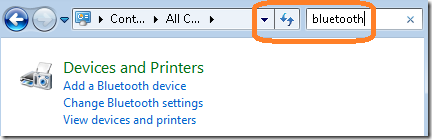
How to access Bluetooth settings through control panel search
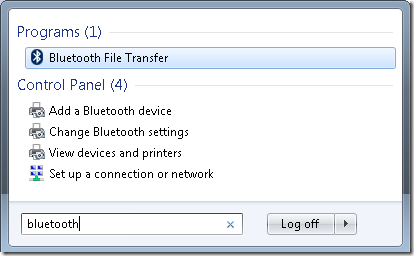
Accessing the different options through Start Menu search in Windows Vista and 7
Using Command-line to access “Bluetooth File Transfer” window (also works with Windows XP)
fsquirt.exe
Can’t find and connect to the computer? http://patricbensen.blogspot.com /2012/02/allowing-bluetooth-devices-to-find-and.html" target="_blank">Read this quick tip to access the Bluetooth option…
Thanks for reading the article and hope this helps!