Beranda · · · ·

New Samsung Galaxy Pocket S5300 Specification By Patricbensen


General2G NetworkGSM 850 / 900 / 1800 / 1900
3G NetworkHSDPA 900 / 2100
SIMMini-SIM
Announced2012, February
StatusAvailable. Released 2012, April
BodyDimensions103.7 x 57.5 x 12 mm (4.08 x 2.26 x 0.47 in)
Weight97 g (3.42 oz)
DisplayTypeTFT capacitive touchscreen, 256K colors
Size240 x 320 pixels, 2.8 inches (~143 ppi pixel density)
MultitouchYes
- TouchWiz UX UI
SoundAlert typesVibration, MP3 ringtones
Loudspeaker Yes
3.5mm jack Yes
MemoryCard slot microSD, up to 32 GB
Internal3 GB
DataGPRSYes
EDGEYes
SpeedHSDPA, 3.6 Mbps; HSUPA
WLANWi-Fi 802.11 b/g/n, Wi-Fi hotspot
BluetoothYes, v3.0 with A2DP
USBYes, microUSB v2.0
CameraPrimary2 MP, 1600x1200 pixels
FeaturesGeo-tagging
VideoYes, QVGA@15fps
SecondaryNo
FeaturesOSAndroid OS, v2.3 (Gingerbread)
CPU832 MHz ARM 11
SensorsAccelerometer, compass
MessagingSMS(threaded view), MMS, Email, Push Mail, IM, RSS
BrowserHTML
RadioStereo FM radio with RDS
GPSYes, with A-GPS support
JavaYes, via Java MIDP emulator
ColorsBlack
- SNS integration
- MP4/H.264/H.263 player
- MP3/WAV/eAAC+ player
- Organizer
- Image/video editor
- Document viewer
- Google Search, Maps, Gmail,
YouTube, Calendar, Google Talk, Picasa
- Voice memo/dial
- Predictive text input
BatteryLi-Ion 1200 mAh battery
Stand-byUp to 800 h (2G) / Up to 500 h (3G)
Talk timeUp to 17 h (2G) / Up to 5 h 40 min (3G)
MiscSAR US0.86 W/kg (head)     0.38 W/kg (body)    
SAR EU0.79 W/kg (head)    
Price group
TestsDisplayContrast ratio: 753:1 (nominal) / 1.180:1 (sunlight)
LoudspeakerVoice 65dB / Noise 65dB / Ring 67dB
Audio qualityNoise -87.6dB / Crosstalk -85.6dB
Battery lifeEndurance rating 34h

New How could you know the total number of SMS/Text Messages you got? By Patricbensen


One of the pre-installed  application on Samsung galaxy phones is SOCIAL HUB.


It includes all the messages you had on your SMS and Email. From this you will see the total number of messages you've been received and sent including those that were failed to be sent.


The number 0 in 0/268 indicates that there is no unread message(s) and

The number 268 indicates the total number of messages.

New How to connect your phone to computer using USB? By Patricbensen


Plug the USB connector on your phone and on the computer.

samsung galaxy pocket homepage
Slide down your finger tip from the top portion of the screen until you see the notifications status.


samsung galaxy pocket notifications


You must see something like this, indicating that the USB connector is plugged-in properly.

Then tap the USB connected to connect to your computer.

samsung galaxy pocket connect USB storage


Tap Connect USB storage.


 Then tap OK.


You can now check your computer to see if your device is already read.

Go to MY COMPUTER then look for the Removable Disk.

If you're having an SD Card on your phone, you will see two phone storage coming from your phone.

New How to Add / Use letter Ñ ñ on your Samsung Phone? By Patricbensen

Using or adding the upper or lower case letter Ñ ñ on your text messages can be a maze specially if you don't know where to find it.


Samsung Galaxy Pocket Select input mmethod
DioPen Chinese IME don't supports these characters. You can chose from Samsung keypad and Swype.


Samsung Galaxy Pocket QWERTY Keypad
Using Samsung keypad

 If you're in the Samsung keypad input mode, make sure that the type of your keypad is in QWERTY Keypad.


Samsung Galaxy Pocket input type setting If not, follow this step to switch to QWERTY Keypad
tap the gear icon then select  QWERTY Keypad


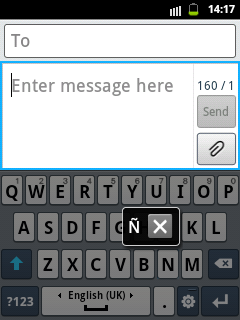
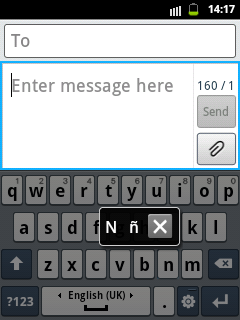
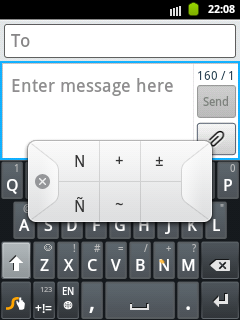
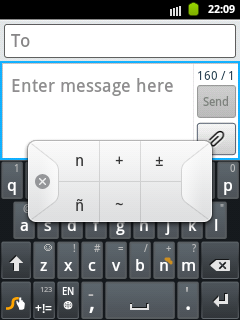
Once you're in the Samsung QWERTY Keypad or Swype Keypad, press and hold the letter N/n until the popup option show.


Screen Capture for Samsung QWERTY Keypad

Samsung QWERTY Keypad for big letter ÑSamsung QWERTY Keypad for small letter ñ


Screen Capture for Swype Keypad

Swype Keypad for big letter ÑSwype Keypad for small letter ñ

New Skype for Samsung Galaxy Pocket By Patricbensen


 Download Skype for your Android Phone


Skype is a powerful chat application that you should have on your mobile phone. Other than the usual chat that it can offer, you can call your family, friends and anyone that has an skype installed whether it's in desktop computer, laptop, or mobile phone. The reliability of this application is so powerful that you can able to make a call from different part of the world.

Features:
  • Skype to Skype IMs, video and voice calls are free* over 3G or WiFi.
  • Make low-cost calls and SMS to mobiles or landlines from your Android smartphone or tablet.
  • Send pictures, videos and files to any of your contacts.
  • Enjoy high-quality sound when you call anyone else on Skype.
  • Talk face to face or show what you’re seeing with front and rear-facing cameras.
  • Talk to your Windows Live Messenger friends on Skype. Sign into Skype with your Microsoft account and have your Messenger, Hotmail and Outlook contacts in one place.

New What is a reversed phone lookup? By Patricbensen

Reversed phone lookup is the term used to find the information about a certain phone number. Instead of the usual way of finding the number of a person by simply knowing the name, the technique is reversed. At this situation, you have the number and you're about to find the name.

To be able to conduct a reverse phone lookup, you will be needing some sort  of an application, a source, or a website.

If you're about to use the service offered by a website, you have to pay them to get the full information you needed, specially the name of a person where the phone number is registered.

Who is conducting a reversed phone lookup?

Most probably you have received a phone call or a text message from an unknown number. If you still don't know the name even if you've asked for it, then the curiosity comes out to your mind that eager you to search for that person's identity.

Why does that person don't want you to know his name? Maybe he is just a prank caller or a secret admirer of yours.

Click here to find out who calls you!

New Free Call and SMS using Viber By Patricbensen


Viber : Free Calls & Messages
by Viber Media Inc.

DOWNLOAD

Viber is the most popular mobile application that supports free sms and call amongst Viber users.

You will see on your Viber contacts who among the list on your phonebook were already have a Viber account. You will also get notified once any of them are recently  installed and join in Viber (only if the notification is turn ON)

The disadvantages of this aapplication are
*You and the other party must be connected to the internet to be able to make a call successful.
*You and the other party (not simultaneous) must be connected to the internet to send and/or receive sms.
*You and the other party must have Viber installed on both of your phones.

But don't be discouraged on the disadvantages. All of the mobile application of same functions have same disadvantages as what Viber have. Internet connection is the main root why this free call and sms service makes possible.