Beranda · · · ·

New Get All Your Instagram Photos to Your Google Drive Account By Patricbensen

Google Drive has a vast potential to provide real-time file saving on cloud storage. G-Drive comes with up to 5 GB free account and upon further requirement, users can opt for the suitable plan. Google Drive is one of the best cloud storage service from Google.

If you are an Instagram fan and has lot of photos and videos on it, you can surely consider G-Drive to backup all your content easily.

Although Instagram can integrate with social sites such as Facebook and Twitter, there is no direct way to download your Instagram content to your G Drive. Using
IFTTT web service you can easily achieve this. Using IFTTT you can easily automate your Instagram backup to G-Drive.


Follow these steps to ensure auto-backup is activated.

Log on to IFTTT.com

Click on "Create a Recipe"

Click on 'this' link and select 'Instagram'.

Allow the popup permission for Instagram account access.

Now create a trigger say 'Any New Photo on My Account' and click on 'Create Trigger' button.

Now click on 'that' tab and click on 'View all Channels" and select 'Google Drive' Channel.

Activate Google Drive channel and allow IFTTT access to your Account.

Once your G-Drive channel is activated, close the tab and move to a recipe by picking Google Drive as an action channel.

Now select 'Add file from URL' as your action, and click 'Create Action' button.

Then click on the 'Create Recipe' button to save your new recipe and turn it ON.

Now, whenever a new photo is added to your Instagram account, it will be backed up on your G-Drive automatically.

New Facebook App shots down on BlackBerry10's, Now Available only on the web By Patricbensen

Facebook and WhatsApp's jumped ship earlier this month, announcing that it would end support for its apps later this year.  The world's biggest social network and its Messenger app will stop working on the BlackBerry OS, including BB10, by the end of 2016. In a blog post on the company's website, the app team said:
"Recently, Facebook made the decision to discontinue support of their essential APIs for BlackBerry and WhatsApp announced they would end support for BlackBerry 10 and BBOS at the end of 2016.
We are extremely disappointed in their decision as we know so many users love these apps. We fought back to work with WhatsApp and Facebook to change their minds, but at this time, their decision stands (but let them know how you feel on social media, using the hashtag #ILoveBB10Apps). Despite this, we have worked hard to ensure our end users have the best experience in light of this decision, and are continuing to search for alternate solutions."

facebook-for-blackberry-10
When Facebook revealed its decision to drop BlackBerry 10, its announcement said Android, iOS and Windows Phone platforms account for 99.5 percent of smartphone sales. The company decided to leave BB, because it wanted to focus its efforts on developing the app for the platforms that sell the most. Users of BlackBerry 10 were understandably upset – it’s one of the world’s most popular websites and lots of people use it to keep in touch on a minute-by-minute basis.


Rather than keep its native app, Facebook has provided a Web-based version to replace it – it’s live now, BlackBerry says the native app will stop working from Today, March 31st, meaning the web app replacement will be mandatory almost immediately. In this scenario, something is better than nothing, although it's hard to shake the feeling that BlackBerry is just saving face here. Blackberry However posted this on it blog concerning the development:

"Facebook will continue to support BlackBerry 10 and BBOS. The experience will be slightly different, but you’ll still get the same Facebook features you love (see right). And, of course the full Android Facebook app is available on the PRIV by BlackBerry.
Our fans are fighting for us (#WeAreBlackBerry), and we love their support (#ILoveBB10Apps). That’s why we have worked hard with Facebook to address some technical challenges and the best solution was to move forward with a Web-based app.
For those just hearing about this news, we have an updated web-based Facebook app that replaces the native app for BlackBerry 10 and BBOS. The update is required because the native app will stop working on March 31. The new web-based Facebook app provides additional features not available on the native app, such as:
  • Ability to reply to comments and see replies to comments.
  • All posts should be loaded, no more “News feed could not be retrieved” or “Post could not be loaded” messages (unless the post was actually removed).
  • Any features available to Facebook website users will be available to you in the updated application.
We’ll continue to keep you updated of any new developments.

To transition to the Web-based experience on March 31st, visit BlackBerry World on your device and apply the available update for the Facebook application at the following links:
A Nielsen survey of 30,000 people at the end of 2015 found that less than one percent use a phone running BlackBerry’s mobile OSes. If you are one of one percent (which I am included), however, you’ll need to update your BlackBerry OS or BlackBerry 10 handset to keep using Facebook from your phone.


RELATED POST: http://patricbensen.blogspot.com .ng/p/apple-store.html" target="_blank">Blackberry Smartphones price list

New When will Android 6.0 Marshmallow Release the Update for Samsung Galaxy NOTE4 AT&T? By Patricbensen

Now Android 6.0 Marshmallow is currently update for Sprint but for AT&T is not receive the update yet.

Are you waiting for the update? Please wait for a couple of weeks more for the upcoming update.

You can check the update by:
 Just go to Settings > About phone > System updates > Check for update

New How to fix unfortunately Gmail has stopped error on Android phone or tablet By Patricbensen

Gmail logo
The unfortunately Gmail has stopped error or Gmail stopped working error can occur if you recently updated your Android operating system to a newer version. This is also a common error among users who flash custom ROMs with incorrect GAPPs package. Due to this error Gmail app force closes every time you try to open it. Usually a simple reboot or wiping cache partition via recovery can fix the unfortunately Gmail has stopped error.  Other times users may need to do some more work. Here are some more methods to fix Gmail stopped working error on Android smartphone and tablets:


 Method 1: Clearing Gmail Cache and uninstalling update 

  1. Go to Settings >>  Apps >> All 
  2. Scroll down select "Gmail" >> Force stop 
  3. Tap "Uninstall updates" >> "Clear Data"
Now try to open Gmail again and see if the error occurs. 

Method 2: For custom ROM users (Cyanogenmod, SlimROM, Paranoid Android etc)

First, download the correct GAPPs package for your Android operating system. Next, boot into recovery and flash the GAPPS package. Go to Advanced and Wipe Dalvik cache and wipe cache partition. Also "fix permissions" if you have that option.

If you have other solutions for the "unfortunately Gmail has stopped" error, please mention them in the comments. Related: http://patricbensen.blogspot.com /2016/02/fix-unfortunately-chrome-has-stopped-android-error.html" target="_blank">How to fix unfortunately Chrome has stopped error on Android  


New Fixed: [DF-DLA-11] [DF-DLA-12] error in Google Play Store By Patricbensen

Error retrieving information from server [DF-DLA-11] [DF-DLA-12]. Both of these Google Play Store errors pop up during app installation and specially during an app update. The first thing you'd want to check is your internet connection. If your internet connection is too slow it may return the above errors. Also restart your phone or tablet and see if that fixed these Google Play errors. If the issue is still unresolved, fear not, this post has several easy solutions for these errors.


Another reason these errors pop up is if you have too many large size apps updating at once. In such case,  it is recommended that you update your apps one by one in Google Play Store. If the problem still persists, here are some possible ways to fix error retrieving information DF-DLA-11 and DF-DLA-12 errors in Google Play Store:

Screenshot showing Google Play update error[DF-DLA-11


Screenshot of Google Play Store download error DF-DLA-12


Method 1: Clearing Google Play Store app data

This solution involves clearing data for Google Play Store and Google Service Framework. This is the most used error fix on Android devices. It will come handy for other Android error codes as well.
  1. Go to Settings >> Apps >> All
  2. From the app list, select "Google Play Store"
  3. Tap "Clear Data"
  4. Again, from All >> select "Google Service Framework" >> "Clear Data"
If the error message is still popping up, also uninstall Google Play Store updates by navigating to Settings >> Apps >> All >> Google Play Store >> "Uninstall Updates". 


Method 2: Resetting app preferences

This is the second most effective solution for Google Play server errors. You will resetting your the settings of all of your apps and games. Note that this method won't remove data, multimedia files, login info or save games from your device.

Go to Settings >> Apps >> Press Menu or the three dots on top right >> Tap "Reset app preferences"

Method 3: Clear App Data 

While your app is installing or updating, cancel it by taping on the "x" icon. Now run the installation
once more. If you still getting the DF-DLA-11 error for a particular app, uninstall the app completely and then re-install it via Google Play Store. If its a system app, you won't be able to uninstall it, so you'll just have to clear its data. To clear app data:
  • Go to Settings >> Apps >> All
  • Scroll down and select the app that you are unable to update or install due to this error
  • Tap "Force Stop" >> "Clear Data"
  • Open Google Play and update the app

Method 4: Connect to a different network

Firstly, turn off your router and turn it back on after 30 seconds. A lot people may get server errors because of temporary connection slowdown, and in such cases you may need to reset your router. Connect to Wi-Fi and see if you still get the DF-DLA-12 error while updating your app or game in Google Play.If you are connected to your Wi-Fi, switch to mobile data or a different Wi-Fi network and run the app update/installation on Google Play. The error may have been caused by a faulty network connection.

Method 5: Check your storage

Do you have a lot of apps installed? Maybe you have too many junk files. Try cleaning them up using apps like cleanmaster. You can also uninstall apps or games you rarely run.

    Final solution: Delete Google account 

    On this method, you will delete your Google account from settings and then simply add it back. This has solved many similar "error retrieving information from server" errors in Google Play store. The complete steps for deleting and adding your Gmail account on Android devices is mentioned here:  http://patricbensen.blogspot.com /2015/08/how-to-fix-error-489-in-google-play.html" target="_blank">How to Fix Error 489 in Google Play Store.


    One of the above methods will likely solve this error and if you have any other fix for this Android error, please mention them in the comments. 

    New Lava Pixel V2 Smartphone Price | Full Specification | Review By Patricbensen

    Lava Pixel V2 Smartphone Price | Full Specification | Review In Bangladesh

    Lava Pixel V2 Smartphone Price | Full Specification | Review In Bangladesh

    Lava Pixel V2 BD Price :
    BDP 14,990 Tk

    Overview:

    1.4 Micron Pixel Size:

    Considerably Larger Pixels than ordinary cameras, This allows more light intake
    per pixel for brighter, clearer images with great details.

    4G Compatible:

    4G LTE support for blisteringly fast network performance

    Truly Powerful & Capable:

    Top notch performance with 64 bit Quad Core Processor

    f 2.0 Aperture:

    Bigger Aperture means 66% more light* reaches the sensor for greater depth of field,
    better focus and outstanding images even in low light condtions

    5P Lens:

    Top-of-the -line, high performance Largan™ Lens for better focus and unmatched clarity:
    Much better than ordinary 3P or 4P lens camera phones

    Wide Angle Selfie:

    Create spectacular self-portraits with a wide panoramic background.
    Now put yourself in the picture and include every detail
    of the amazing world that surrounds you.

    Full Specifications Of Lava Pixel V2 :


    General
    Release date September 2015
    Form factor Touchscreen
    Dimensions (mm) 141.60 x 70.80 x 7.60
    Weight (g) 128.00
    Battery capacity (mAh) 2500
    Removable battery No
    Colours White, Black, Blue
    SAR value 0.09
    Display
    Screen size (inches) 5.00
    Touchscreen Yes
    Resolution 720x1280 pixels
    Pixels per inch (PPI) 294
    Hardware
    Processor 1GHz  quad-core
    Processor make MediaTek MT6735
    RAM 2GB
    Internal storage 16GB
    Expandable storage Yes
    Expandable storage type microSD
    Expandable storage up to (GB) 32
    Camera
    Rear camera 13-megapixel
    Flash Yes
    Front camera 8-megapixel
    Software
    Operating System Android 5.1
    Skin Star OS 2.0
    Connectivity
    Wi-Fi Yes
    Wi-Fi standards supported 802.11 b/ g/ n
    GPS Yes
    Bluetooth Yes
    NFC No
    Infrared No
    USB OTG Yes
    Headphones 3.5mm
    FM Yes
    Number of SIMs 2
    SIM 1  
    SIM Type Micro-SIM
    GSM/ CDMA GSM
    3G Yes
    4G/ LTE Yes
    Supports 4G (Band 40) Yes
    SIM 2  
    SIM Type Micro-SIM
    GSM/ CDMA GSM
    3G Yes
    4G/ LTE No
    Sensors
    Compass/ Magnetometer No
    Proximity sensor Yes
    Accelerometer Yes
    Ambient light sensor Yes
    Gyroscope No
    Barometer No
    Temperature sensor No


    New English 1st & 2nd Paper Full And Final Suggestion for HSC Examination 2016 By Patricbensen

    English 1st & 2nd Paper Full And Final Suggestion for HSC Examination 2016 

    English 1st & 2nd Paper Full And Final Suggestion for HSC Examination 2016


    Dear visitor today i come with the full and final English 1st & 2nd Paper Full And Final Suggestion for HSC Examination 2016 . Here is this given bellow .. 

    Hope it will helpful for you !
    Final suggestion
    Sub: English 1st Paper

    Passage:-
    Unit 1, Lesson 5     The Present age
    Unit 3 Lesson 1 [b]    Communicative competence
    Unit 3 Lesson 2     Statistics show that…
    Unit 3 Lesson 3     Two friends Raghib and Adeeb
    Unit 4 Lesson 5[a]      the village somal
    Unit 5 Lesson 6     Jerry
    Unit 6 Lesson 1 the environment
    Unit 6 Lesson 3 In recent years, there have been many alarming reports
    Unit 6 Lesson 4 Humans animals and plants are all important elements
    Unit 7 Lesson 5 How safe will the buildings in the city of Dhaka
    Unit 9 Lesson 1     education is
    Unit 9 Lesson 3       Bangladesh is
    Unit 10 Lesson 4 entertainment through the ages
    Unit 11 Lesson       A society’s culture is made up all of its ideas
    Unit 11 Lesson 7[B]~~~The British have reputation
    Unit 13 Lesson 3        In Bangladesh, the retirement age
    Unit 13 Lesson 3[d]      Aysha begum….
    Unit 14 Lesson 3        One very conspicuous change in our society
    Unit 15 Lesson 2          education is one of the
    Unit 17 Lesson 6         Electronic mail
    Unit 20 Lesson 3         Ismail Hossain…
    Unit 21 Lesson 1           globalization has
    Unit 21 Lesson 2 Capitalism developed tin the European countries
    Unit 21 Lesson 4          Sports are a popular form of entertainment
    Unit 21 Lesson 5        although globalization
    Unit 21 Lesson 6        The process of globalization obviously requires
    Unit 22 Lesson 2
    Scientists have
    Unit 23 Lesson 1       the last century
    Unit 23 Lesson 3[b]          feeding the
    Unit 23 Lesson 2        the most significant event for Bangladesh
    Unit 24 Lesson 4      Gender discrimination in Bangladesh begins at birth


    Q.No-13. Paragraph
    (1) Bangladesh
    (2) Globalization
    (3) Important of learning English
    (4) Tree plantation
    (5) Facebook
    (6) Gender discrimination
    (7) earthquake

    English 2nd
    1. Reporting writing:
    (a) Write a report on the prize giving ceremony of your collage
    (b) Write a report a book fair / Pahela
    (c) Write a report A road accident you have witnessed

    1. Paragraph writing
    (a) Important of learning English
    (b) Tree Plantation
    (c) Deforestation
    (d) Gender discrimination
    (e) Traffic Jam
    (g) World cup
    (g) A book fair

    1. Composition:
    (a) Student life and social service
    (b) Deforestation
    (c) Natural calamities of Bangladesh
    (d) Wonder of Modern Science
    (e) Newspaper
    (f) The day you remember most

    1. Email:
    (a) Write an Email to your friend congratulating for his brilliant success
    (b) Write an Email Picnic
    (c) Write an Email about of newspaper
    (d) Write an Email for sending gift

    1. Application:
    (a) Write an application on set up anything
    (b) Write an application T.c
    (c) Job Application


    Md. Najmul Hassan Sir

    B.B.A Honours Final Year

    New Fix Mi Band “too many bands nearby” pairing error By Patricbensen


    The Mi Fit app can get buggy sometimes and it stops syncing your Mi Band. Simply unpairing and pairing it back resolved the http://patricbensen.blogspot.com /2016/03/fix-mi-band-connect-failed-retry-no-band-error.html" target="_blank">Mi Band connect failed error. However, some users were unable to pair their Mi Band and got "too many bands nearby" error. This can actually happen because there are too many Bluetooth devices near you. So a suggestion to check and turn off Bluetooth on all your nearby devices except your phone which has MiFit installed. Now try to pair the band. If you are still facing problems, here is an effective method to fix too many bands nearby error in Mi Fit app for Mi Band 1S Pulse, 1A and other versions.

    Screenshot of Mi Fit app showing "Too many bands nearby" error while syncing

    Method: Remove all paired/saved Bluetooth devices from your smartphone

    • Go to settings >> Bluetooth
    • Tap on the gear icon next to each saved Bluetooth device (including MiBand)
    • Select “Forget”
    • Now uninstall Mi Fit app
    • Download and reinstall Mi Fit and sign in
    Removing paired bluetooth devices from Android settings
    Removing paired  Bluetooth devices

    Pairing Mi Band in Mi Fit

    After completing above steps you should be able to pair and sync your Mi Band to your smartphone. You can also try pairing your device later in the night when there are less people around with Bluetooth enabled devices. Sometimes too many Bluetooth signals nearby can cause this pairing issue in fitness trackers.


    New Fix ERR_NAME_RESOLUTION_FAILED Error in Windows By Patricbensen


    The ERR_NAME_RESOLUTION_FAILED No Internet error occurs in Chrome, Firefox or Internet Explorer browsers on Windows IS. This was a common error in Windows 7 and Windows 8 systems but many Windows 10 users are also reporting it. There is no single sure-fix for this internet error but most users have solved it my using a combination of simple methods. Here are the methods to fix 193 ERR_NAME_RESOLUTION_FAILED in Windows 10, 7 & 8 OS:


    The error just affects random websites. One website may load easily while others may return the ERR_NAME_RESOLUTION_FAILED or no internet error. First make sure your internet connection is working fine because sometimes your connecting might be down due to ISP maintenance or router failure.

    Method 1: Network commands in Command Prompt

    1. Press Windows key or click Windows button
    2. Type “Command Prompt” >> right click on it and select “Run as Administrator”
    3. Now type the following list of commands
      • netsh winsock reset
      • netsh int ip set dns
      • ipconfig /release
      • ipconfig /renew
      • ipconfig /flushdns
    Exit the command prompt and restart your PC and see if the error is fixed.

    Method 2: Manually setting DNS address for your Network adapter

    Here are the quick steps:
    1. Press Windows key or click start
    2. Type “Control Panel” in windows search bar >> select “Control Panel”
    3. Find Network and Sharing Center (you can use the search bar in control panel)
    4. On the left click on “change adapter settings”
    5. Under Network tab, double click on “Internet Protocol Version 4(TCP/IPv4)"
    6. Select “Use the following DNS server addresses”
      • Set Preferred DNS Server to 8.8.8.8
      • Set Alternate DNS Server to 8.8.4.4
    7. Open your browser and check if the error is fixed.
    FIX ERR_NAME_RESOLUTION_FAILED Error
    Setting DNS Server Addresses


    The above steps are explained in more detail on this post http://patricbensen.blogspot.com /2015/08/how-to-fix-dns-probe-finished-nxdomain-chrome-error.html" target="_blank">How to fix Dns_Probe_Finished_Nxdomain Chrome Error


    Method 3: Run System File Checker

    1. Press Windows key or click on start
    2. Type “Command” on search bar and right click “Command Prompt”
    3. Select “Run as Administrator”
    4. Type sfc/scannow
    5. Press Enter


    Now the System File Checker will scan all of your system files and will correct any error it finds. If network related system files were corrupt they will replaced by the original files.

    Let us know if any of the above methods worked for you. If you any other solution for ERR_NAME_RESOLUTION_FAILED No Internet error, drop a comment below.

    New Fix Mi Band Connect Failed Retry No Band error By Patricbensen

    This post has the solution for a "Couldn't connect band, tap to retry" Mi Band error that stops tracking your steps in the Mi Fit app.  On the older version of the app, the Mi Band fails to sync with the Mi Fit app giving the error: Mi Band connect failed, pull to retry. When you go to the settings it will No band detected error. If you don’t fix this error right away, your activities won’t be logged in the MiFit app. To solve this problem, first turn off Bluetooth and then restart your smartphone. After the device reboots, open Mi Fit app and try to sync your Mi Band again. If that didn't work, here is how you can fix the MiBand connect failed error in Mi Fit for android:

    How to fix couldn't connect band in Mi Fit app


    Method 1: Restart device

    Turn off Bluetooth and turn it back on. Now try to sync again. If that didn't work, turn off Bluetooth again and then restart your phone. If your Bluetooth is working fine but you are still unable to sync your MiBand in MiFit, proceed to method 2:

    Method 2: Unpairing the Mi Band from the Mi Fit settings

    • Open Mi Fit
    • Go to Settings >> Tap “Mi Band” (signed in)
    • It will show “no band” error
    • Scroll down and tap “Unpair” >> OK
    • Close Mi Fit app and restart it
    Mi Band connect Failed, pull down to retry error

    Mi-Band-no-band-detected-error

    How-to-unpair-Mi-Ban-in-Mi-Fit
    Now you will be asked to pair your Mi Band again. Simply tap on the Mi Band when the the LEDs start blinking and it will be synced to MiFit app on your android. All of your data prior to the error will now show up and the Mi Band will start tracking your steps/calories/sleep etc like normal.

    New One or more network protocols missing [FIXED] Windows 10 By Patricbensen

    The one or more network protocols missing is an error message that appears after you perform network connection troubleshooting on Windows 10. Many users will troubleshoot their wireless or Ethernet connection after getting “the connection has timed out” error while loading up a webpage on their browser. This is a protocol or network connection related issue while many think it is a Chrome or Firebox browser error. Here are the possible methods to fix one or more network protocols missing http://patricbensen.blogspot.com /search/label/Windows%2010%20Error%20Fix" target="_blank">Windows 10 error:


    Method 1: Reset winsock

    1. Press the windows button (key)
    2. Type “cmd” in the Windows search bar
    3. Right click on “Command Prompt” and select “Run as Administrator”
    4. Type netsh winsock reset >> Press Enter
    5. Type netsh int ip reset >> Press Enter
    6. Exit command prompt

    Restart PC and try to open a webpage on your browser.

    Method 2: Install Protocol in WiFi/Ethernet network settings

    1. Press windows key and type Control Panel in Windows search bar
    2. Go to Control Panel >> select Network & Sharing Center
      • Or search “network and sharing” in Control panel
    3. On the left side, click on “Change adapter settings”
    4. Right click on your active network connection (Wi-Fi or Ethernet LAN)
    5. Click on “Properties”
    6. Click on “Microsoft Network Adapter Multiplexer Protocol”
    7. Click “Install” >>Select “Protocol” >> Install “Reliable Multicast Protocol” (or any other protocol you find there)
    8. Select “OK”
    Fixing One or more network protocols missing error


    After installing the Protocol for their networks, many Windows 10 users have solved the One or more network protocols missing error.

    Method 3: Automatically obtain DNS server address

    If you have manually assigned the DNS server address, then simply setting it to automatic may resolve the network protocol missing error.
    1. Click Start button or windows key on your keyboard
    2. Type “Control Panel” in the search bar and then open it
    3. Now select “Network and sharing center” (you can search for “Network and sharing” in control panel)
    4. On the left, select “change adapter settings”
    5. Right click on your active network connection (Wifi or LAN) >> click “Properties”
    6. Under the Networking tab double click Internet Protocol Version 4 (TCP/IPv4)
    7. Enable Obtain DNS server address automatically >> Click Okay
    8. Similarly set DNS server address to automatic for Internet Protocol Version 6 (TCP/IPv6)
    Obtain DNS server address automatically


    Let us know if the above methods fixed the protocol missing error on your Windows device. If you have other solutions drop a comment.

    New Best free Android games of 2016 -Brick Breaker Hero By Patricbensen

    Today we are going to tell you about the best academy game for Brick Breaker series for android user.

    The game called "Brick Breaker Hero" which is a good game for free to download.


    Game Features:
    - Classic brick breaker Android breakout game play with a modern, mobile twist!
    - Over 200 fun and challenging levels with more coming soon!
    - Many power-up spells your hero can cast, containing spectacular effects and aiding your quest to win each level!
    - Unique kingdoms, each with their own theme and unique adventure!
    - Boss and mini-boss fights, each having a new ability to challenge your hero!
    - Easy to play, difficult to master: Try to achieve 3 stars on each level!


     https://play.google.com/store/apps/details?id=com.gamecircus.bbh


    New Why Smartphone Backup Is Important? By Patricbensen

    Smartphone back up is a great way to ensure you do not loose important data, memories, favourite collection and sensitive files as time passes. Smartphone is a tiny cool gadget which eases many activities at instant click, however it it always at a risk. Make a good habit of taking backup of your phone after certain intervals so that it will be of great assist to you in any cases such as OS crash, phone lost, accidental damage, hacking etc.

    smartphone backup

    Many times we hear about online hacking and stealing financial information from computers. Open Wi-Fi connections, Bluetooth, Infra Red and Virus are some easy ways hackers try to enter into your devices. As data is always subjected to get exposed with all such ways, it is necessary to stay safe with scheduled backups and even with best antivirus support.

    Google Android
    For Android users, Google automatically backs up portion of smartphone's data to user’s online accounts. Go to Settings > Backup & Reset and select ‘Backup My Data’ and ‘Automatic Restore’. At the first time it will take some time but later on it will be faster.


    Apple iOS
    If you are using Apple’s iPhone then iTunes has best option “Back Up”. Rest stay assured for all your contacts and other data. In case your device hangs up or needs resetting, “Restore from Back up” will solve the purpose.

    iCloud is again best option for Apple users. It is online backup system which works automatically while Wi-Fi is on. With this you get as much as 5GB of space to store you data. You need to go to Settings > iCloud > Storage & Backup and turn on the backup. In Manage Storage options you can easily select options to sync such as Facebook data, music files, contacts, chrome etc.

    Samsung Kies
    Best option for Samsung users. It is Samsung’s own software to keep your data safe at a place. A short setup allows user to connect his phone with pc with unique IP and PIN to enable the procedure.

    BlackBerry
    BlackBerry Desktop is all in one RIM’s proprietary software for their worldwide users. It is very unique and easy for navigation. You can even use external storage or flash drives to take the backup.

    Windows Phone
    Microsoft has made its own software for their smartphone OS backup called ‘ActiveSync’. Software works perfect with most of the windows operating systems with easy navigation.

    ‘My Phone’ is another app designed by Microsoft especially for Windows phones. It looks tiny but potentially great to backup everything on your device. It works well with windows mobile 6.0, 6.1 and 6.5. With logging in from your live account and free data up to 200Mb, which is surely not enough nowadays, you need to pay for more and surely still quite good to go with.

    PIM Backup is great app for those who just don’t want to go with online sync and external pc connections. This app allows user to take backup on SD Cards easily. But still ActiveSync and My Phone are preferred everywhere.

    Symbian
    For Symbian OS based phones tools such as Ovi Suite, The Symbian Tool are available. Older version of Nokia and Samsung came with Symbian support and can be easily backed up with these utilities.  

    Other favourite tools include Palm Pre Pixi, Microsoft Sync Toy for PC, ChronoSync for Mac which are great options for backups.

    New How to Enter Proxy Settings in Firefox and Chrome Browsers? By Patricbensen

    The Internet is all hide and seek playground. Whether it is for work or just surfing, everyone sometimes wants to stay away from other's eyes. That's the reason the term 'Proxy' plays around in internet world. 

    Proxy settings allow a user to use different IP address into their browsers so that they appear anonymous for the rest of the world. Technically it is impossible to stay completely hidden while you are on the internet, but surely for all daily purpose, you can stay assured of your anonymity.

    Proxy servers have wide applications for businesses and home networks. Whether it is restricting inappropriate content to kids or disallowing employees to surf anywhere else other than relevant sites, proxies can help millions of small and big enterprises to solve the purpose. 


    Proxies with limited access to the internet can save lot of official man hours and also speed up the networking speed considerably. (also called name resolution process). It also acts as a LAN switch between user and the entire internet world.

    Below are the types of proxies which are mostly used everywhere.

    Transparent Proxy
    This type of servers identifies themselves as a proxy server and also clearly shows their address through HTTP headers. These type of proxies do not provide complete anonymity.

    Anonymous Proxy 
    This type of servers do not display IP address and have better anonymity levels. Although they are detectable, provide enough privacy online.

    Distorting Proxy
    They are identified as proxy servers but display random server address to fool visitors.

    High Anonymity Proxy
    They do not identify themselves as a proxy server and also do not make available the original IP address.

    Change proxy settings as per below instructions.

    For Firefox:

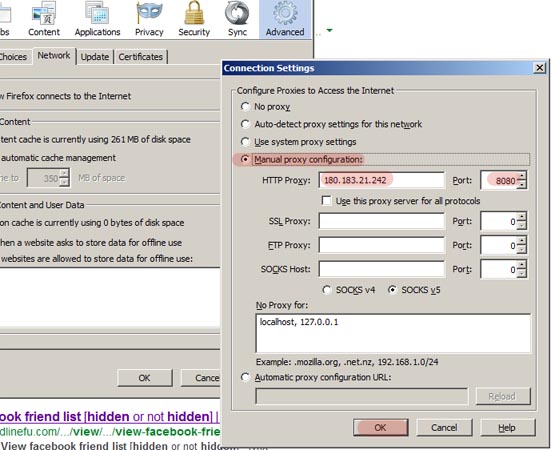
    Click Tools > Options > Advanced button> Settings (In Connection)

    change proxy firefox


    Select "Manual Proxy Configuration"

    Enter correct working IP address (You can Google and get free proxy servers)

    change proxy firefox


    Click Ok, restart browser and check 'what is your IP' website to ensure your IP is changed.

    For Chrome:

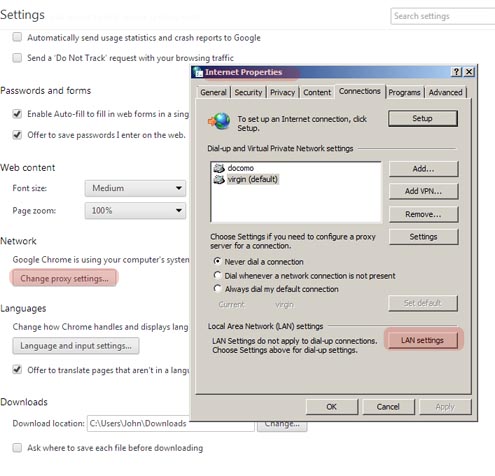
    Go to Settings> Expand to show advanced settings > Network

    Click on Change proxy settings (This will open system's proxy settings box)

    change proxy chrome


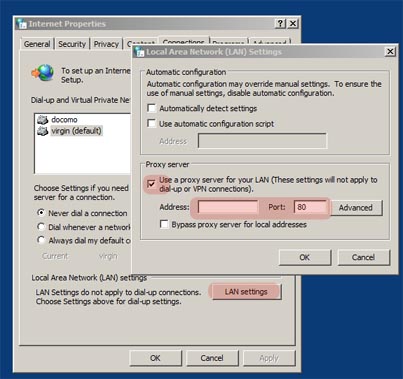
    Click LAN settings in Local Area Network Settings at bottom

    Tick, use a proxy server for your LAN, Enter valid proxy IP address and click OK.
    (You can Google and get free proxy servers)

    change proxy chrome


    For Netscape Browser

    Go to Tools Menu, Select Options, Select General, Go to Connection Settings.

    check Manual Proxy Configuration and Enter the proxy server's IP address in http proxy field and port into port field. You are done.

    For Opera Browser

    Go to Tools Menu, Select Preferences, Go to Advance Tab, Select proxy servers. 

    Now check the box next to http and enter new proxy details in the field. You are done.

    Safari Browser

    Select Preferences, Select Advanced, select proxies: change settings.


    Check the box next to web proxy (http) and enter new proxy details in the field. Click on Apply and that must work.

    You are ready to move anonymously. 

    Please note that using proxy server address without express permissions is illegal. Use them at your own risk.

    New Best Ways to Prepare Bootable USB for Installing OS on Your Computer By Patricbensen

    Preparing bootable USB drive for OS installation is a pretty easy task. Your PC may need it any time. Using CD's, DVDs have become old fashioned and flash drive is smartest and fastest way to install operating system on a computer.

    The basic thing you will need is a proper ISO/image file of the operating system. You can get it from many online free resources. Keep it ready on PC from where you are going to prepare a bootable flash drive. You can get Windows ISO images directly from Microsoft's download center.

    Linux comes in many variants and distributors which includes Ubuntu, Linux Mint, Fedora, Sabayon Linux, Gentoo, openSUSE, Slackel, PureOS, Mageia, PCLinuxOS, CentOS, FaunOS, Rosa, Chakra, SliTaz, Mandriva, Debian, WattOS, Knoppix, Netrunner, Slax, Qubes OS, Open Xange and many more. You can just Google them to get OE ISO copies.

    Below are some best utilities used everywhere to transfer an ISO to USB for preparing Bootable flash drive.

    Win32 Disk Imager (For Windows only)
    Win32 Disk Imager is great utility from Superforge with new developments. It is easy to handle and you can get image file easily from company's website.

    In the utility, you need to specify the downloaded imager file and the target device such as USB or flash drive. Your device will be ready with bootable files.

    Windows 7 USB/DVD Download Tool
    An official utility from Microsoft which allows a user to install Win7 or Win8 on their computer. By changing the boot order to from BIOS to USB, a direct installation will start.

    For this, you need Win7 or Win8 ISO file, which you can get from Microsoft’s download sites.

    UNetbootin
    This is one of the most popular USB flash utility to create a bootable drive. This utility is simple to use and has much more features included such as Parted Magic- Partition manager, Super Grub disk- repair and restore GRUB installs, Backtrack-Great utility for Network analysis and penetration tests, Smart Boot Manager- handles boot functions on faulty BIOS, FreeDos, Gujin-Graphical bootloader, NTPasswd-Reset windows passwords and edit registries, Ophcrack-Recover win passwords.

    It can automatically download the above Linux files from online servers.

    The generalized procedure includes downloading of proper OS ISO file. Use UNetbootin utility to mount this ISO on flash/USB drive. After rebooting you will have to edit BIOS boot sequence to specify boot from USB/Flash drives and then to restart the computer.

    Note: You will need to format USB drive (FAT 32 for win) or on Linux- GParted or some partition manager.

    WiNToBootic
    This is very easy utility and works faster. All you need is an ISO file, setup folder or DVD to copy on a flash drive through WiNToBootic. The operation is quite simple absolutely fast as it is a standalone program and do not need installation.

    Windows Bootable Image (WBI) Creator
    WBI Creator is free utility that allows a user to prepare bootable USB from windows installing folders or CD/DVDs. You just need to specify the OS type and setup location. It will automatically start transferring the image on flash/USB drive and create a bootable drive.

    WinToFlash
    It’s a commonly recommended program because of its ease of operation. You can create a bootable disk from XP, Vista, Win7, Server 2003 and 2008 CD/DVDs. It also creates WinPE (Pre-install environment) which is great for troubleshooting and repairing the windows system.

    WinToFlash can also be used to create MS-Dos bootable drive.

    XBoot
    Its again a free utility in which multiple ISO files can be combined into single USB. E.g. you can create OS installation drive including other utilities for antivirus, rescue CDs etc on single USB. Just drag and drop ISO files into the program and create bootable USB drive. XBoot requires .Net framework 4.0 to work on your PC from which you will be making bootable USB drive.

    This is something different. This utility does not create a bootable disk to install windows or Linux operating on your PC, however with Ubuntu System you can run your PC with a basic operating system of their own custom interface Ubuntu Operating system. Many recent laptops are coming with Ubuntu Startup UI instead of preinstalled Dos or Windows OS. Just similar to Windows look, Ubuntu works pretty well and you can even use drive’s other space for saving your files and folders.

    You may also like Most Common Reasons for Laptop Shutting Down Multiple Times

    USB ImageWriter (For Ubuntu only)
    Ubuntu usb image writer is freely available in Ubuntu Software Centre. Using this utility you can load OS .img file to USB drive. This tool works great with Debian based Linux OS such as Peppermint OS, Lubuntu etc.
    For this Go to > Main Menu > Ubuntu Software Center > (search Image Writer in search bar)
    Click Install.

    Ubuntu Image writer application will start. Connect formatted USB disk to pc. Follow the easy procedure on the utility, select .img file from your pc location. (The .img file of OS you want to prepare disk)

    Restart PC with boot from USB option set in bios and you are all set to go with new Linux OS.

    Universal USB Installer
    Pretty simple tool as others. Just locate an ISO file and start the operation to transfer the files on USB to create bootable disk. Its works great with most of the Linux distrubutiosn. However the flash drive must be formatted to Fat16, Fat32 or NTFS drive. Download


    Rufus
    It’s a portable utility which can create bootable USB drives for Windows and Linux. It can also scan your USB drives for bad sectors. Rufus works pretty well with most of the Linux distributions.  It looks similar to the basic formatting tool available in windows. It also has other utilities such as Ultimate Boot CD, Parted Magic and BartPE.