Beranda · · · ·

New What to do when your Samsung Galaxy A3 smartphone won't turn on? By Patricbensen

Couldn't get your Samsung Galaxy A3 smartphone to turn back on? This post might be able to help. Highlighted in this content are a few workarounds you can do before you jump into a notion of setting up a service appointment.


There are many factors that can cause your smartphone to shut down or not turn on. Most of the time, this issue is tied to the phone's battery that is completely drained or damaged. Other culprits include faulty apps or system bugs that somehow affect the device's power system. In worst cases, a device may not be able to turn on because of hardware damage. This is usually the case when the phone was dropped or exposed to water or other forms of liquid.

How to determine the most possible cause?


You can refer to the following scenarios to isolate the problem and determine the underlying cause.

If the phone suddenly powers off and won't turn on after downloading and installing a third-party application. Most likely the problem is caused by the recently added application. In this case, you can try to boot your phone into Safe Mode and then assess its performance while in this mode. If the problem is gone while in Safe Mode, clearly it's a third-party app that's causing trouble. Your option would be to either disable or uninstall the faulty application.

If the phone suddenly powers off while in use. It's possible that it has run out of power or the battery has just gone dead. Charging the phone for a few minutes (at least 15 minutes) can help you determine if this is the cause.

If the phone won't turn on after you dropped it. In this case, it could be due to a physical damage from the drop. Your device is likely damaged from that dropped and needs repair.

If the phone won't turn on after it was exposed to moisture or got wet. Needless to say, the phone is liquid-damaged so it won't power on. Just like physical damage, liquid damage often requires a technician's aid to get phone fixed.

Standard Troubleshooting Methods and Workarounds


To ensure the problem is not due to insufficient battery life, try to connect your device to a charger and then let it charge for a few minutes. While the phone is connected to the charger, try to turn it on.

Also verify and ensure that the phone, charger, and USB cable are not damaged. To check for physical or liquid damage, check the battery, battery compartment, and USB connections for any corrosion and bent pins. Also inspect the Liquid Damage Indicator or LDI located on the battery and in the battery compartment of your device. An indication that the device has no damage is the LDI in solid white, or white with pink or purple Xs. Other than that, denotes a presence of physical or hardware damage to the phone. 

When charging, make sure the USB connection is firm with very little mobility.

On devices with removable batteries, removing the battery for 30 seconds then replace the battery would often do some wonders in these cases. If the phone has non-removable battery, an alternative method is to press and hold the Power and Volume down buttons for 30 seconds.

If the phone remains dead, then let it charge a little longer (up to an hour or two). 

When to take your phone to a technician?

If your Samsung Galaxy A3 still fails to turn on after performing all possible solutions and workarounds available, then it's time to set up an appointment with a Samsung technician. Your device needs service in order to turn back on and get running again.


New LG X Screen Mobile Phone Full Specifications And Price By Patricbensen

LG X Screen Mobile Phone Full Specifications And Price In Bangladesh


LG X Screen Mobile Phone Price In Bangladesh
Coming Soon [ Not available till now ]

Last Update On 31 July 2016

LG Showroom Address IN BD

Full Specifications Of LG X Screen Mobile Phone :

Network


TechnologyGSM / HSPA / LTE
2G bandsGSM 850 / 900 / 1800 / 1900 - SIM 1 & SIM 2 (dual-SIM model only)
3G bandsHSDPA 850 / 900 / 1900 / 2100 - K500N
4G bandsLTE band 1(2100), 3(1800), 7(2600), 8(900), 20(800) - K500N
LTE band 3(1800), 7(2600), 20(800), 38(2600) - K500DS
SpeedHSPA 42.2/5.76 Mbps, LTE Cat4 150/50 Mbps
GPRSYes
EDGEYes
LaunchAnnounced2016, February
StatusAvailable. Released 2016, March
BodyDimensions142.6 x 71.8 x 7.1 mm (5.61 x 2.83 x 0.28 in)
Weight120 g (4.23 oz)
SIMSingle SIM (Nano-SIM) or Dual SIM (Nano-SIM, dual stand-by)
DisplayTypeIPS LCD capacitive touchscreen, 16M colors
Size4.93 inches (~65.4% screen-to-body ratio)
Resolution720 x 1280 pixels (~298 ppi pixel density)
MultitouchYes
- Secondary display, 80 x 520 pixels, 1.76 inches
PlatformOSAndroid OS, v6.0 (Marshmallow)
ChipsetQualcomm MSM8916 Snapdragon 410
CPUQuad-core 1.2 GHz Cortex-A53
GPUAdreno 306
MemoryCard slot microSD, up to 256 GB (dedicated slot)
Internal16 GB, 2 GB RAM
CameraPrimary13 MP, f/2.2, autofocus, LED flash
FeaturesGeo-tagging, touch focus, face detection, panorama
Video1080p@30fps
Secondary8 MP
SoundAlert typesVibration; MP3, WAV ringtones
Loudspeaker Yes
3.5mm jack Yes
CommsWLANWi-Fi 802.11 b/g/n, Wi-Fi Direct, DLNA, hotspot
Bluetoothv4.1, A2DP, LE
GPSYes, with A-GPS, GLONASS
NFCYes (market dependent)
RadioFM radio
USBmicroUSB v2.0
FeaturesSensorsAccelerometer, proximity
MessagingSMS(threaded view), MMS, Email, Push Mail, IM
BrowserHTML5
JavaNo
- MP4/H.265 player
- MP3/WAV/eAAC+/Flac player
- Photo/video editor
- Document viewer
BatteryNon-removable Li-Po 2300 mAh battery
Stand-byUp to 120 h (2G) / Up to 120 h (3G)
Talk timeUp to 9 h (2G) / Up to 14 h (3G)
MiscColorsBlack, White, Pink Gold
SAR EU0.55 W/kg (head)    

New Airtel Reduces Validity Period Of N200 For 2GB And N500 For 6GB Data Plans Respectively By Patricbensen

Lots of people are still angry that Airtel went ahead to launch 200 for 2GB and N500 for 6GB data plans that work only with 2G network, and airtel has even decided to pile up the misery by shortening the validity period of these data plans.

If you are aware of the plans or if you have used it before, you will know that Airtel initially launched the N200 2G network data plan with 14 days validity period and that of the N500 with 28 days validity.
Airtel-reduces-validity-period-2G-network-data-plans

But since Airtel believe that change is the only constant thing in life, they went ahead to slash down the validity period for the N200 plan from 14days to 10days and that of the N500 from 28days to 25days.

If you are interested in the plan and still ready to subscribe with those validity period simply dial *482# and reply with 1 for the N200 plan or reply with 2 for the N500 plan.

Must Read: http://patricbensen.blogspot.com/2016/07/smile-breaks-record-unveils-cheapest-4g.html" target="_blank">Smile breaks record, launches cheapest 4G LTE mobile call rate to all networks in the world

Note that these Airtel data plans work on all devices but only on 2G network data, therefore you have to switch your network to 2G mode before you can use these plans.

To  check for your remaining data balance at any time, simply dialy *123*10# and it will be displayed on your screen.

We know that 2G network can be slow and frustrating especially when you are using it on modern high end devices, but we have succeeded in writing on a method you can use to http://patricbensen.blogspot.com/2016/07/easiest-way-to-increase-speed-of-airtel.html" target="_blank">increase the speed of these Airtel 2G plans considerably.

Though we cannot still figure out the rationale behind this Airtel latest move and we know that lots of folks out there will be utterly disappointed with Airtel on this one.

New Smile Breaks Record, Unveils Cheapest 4G LTE Call Rate To All Networks In The World By Patricbensen

Nigerian 4G broadband network provider Smile Communications has broken all-time record by launching the cheapest mobile 4G LTE mobile call rate to virtually all networks in Nigeria and the world at large.

With the latest unveiling of the SmileVoice app that function just like normal SIM card, subscribers to Smile 4G LTE broadband network service can now make crystal clear calls to all national and international mobile destinations at only 8K/S (N4.80K/min) rate.
Smile-unveils-cheapest-mobile-4G-LTE-call-rates

This making it the cheapest call rates that we have ever seen when compared to other 4G LTE and even on 3G GSM network service providers in the country.

The highlight of the Smile new SmileVoice app unveiling is that unlike other 4G LTE network providers that will require you to use a 4G enabled handset to access their 4G network services, with the SmileVoice app, you can enjoy this clear and cheapest call rates even without a 4G enabled handset.

Must Read: http://patricbensen.blogspot.com/2016/04/how-to-unlock-your-spectranet-mifi.html" target="_blank">How to unlock Spectranet Mifi modems for free to use all SIMs

With this latest development, Smile has no doubt raised the bar in their services and set up a standard that other 4G LTE network providers in the country have to deal with in order to be in the completion.

Especially Ntel the newest entrant 4G LTE network providers should watch their back on this one as the competition is getting fiercer and consumers are ever ready to adopt the services that best suits their need, and are always drifted towards network providers with cheaper and quality services.

Other famous 4G LTE mobile network providers in the country are Swift and Spectranet and they should also watch out before they get drowned by their rivals.

Start calling your friends and family members now whether home or abroad at cheapest rate with the latest SmileVoice app!

New zzKey Huawei Advanced Tool Latest Version V2.7.2.9 Full Crack Setup Free Download By Patricbensen

You are about to download and install zzkey Huawei advanced tool latest updated version v2.7.2.9 full cracked setup for all Huawei smartphones and tablets. zzKey Huawei advanced tool software is completely free to download and very simple to use. Many various models has added in this latest version of this tool. So before download and installing this useful tool on your windows PC, Lets have a look whats new in this version.

zzKey Huawei Advanced Tool Latest Version V2.7.2.9 Full Crack Setup Free Download


Cool Features:

  • Direct unlocking.
  • IMEI Repair.
  • Flashing.
  • Block operation.
  • Repair simlock.
  • Android new security.
  • Modem.
  • MTK.
  • More.......


New Added Phones:

  1. CHC-U01 (Huawei Gplay Mini) (Permanent Direct Unlock, Permanent Imei Repair, Full Security Area Repair) W1st
  2. CHC-U03 (Huawei Gplay Mini) (Permanent Direct Unlock, Permanent Imei Repair, Full Security Area Repair) W1st
  3. CHC-U23 (Huawei Gplay Mini) (Permanent Direct Unlock, Permanent Imei Repair, Full Security Area Repair) W1st
  4. Che2-L03 (CherryPlus-L03, Honor 4X) (Permanent Direct Unlock, Permanent Imei Repair, Full Security Area Repair) W1st
  5. Che2-L11 (CherryPlus-L11, Honor 4X) (Permanent Direct Unlock, Permanent Imei Repair, Full Security Area Repair) W1st
  6. Che2-L12 (CherryPlus-L12, Honor 4X) (Permanent Direct Unlock, Permanent Imei Repair, Full Security Area Repair) W1st
  7. Che2-L23 (CherryPlus-L23, Honor 4X) (Permanent Direct Unlock, Permanent Imei Repair, Full Security Area Repair) W1st
  8. Che2-TL00 (CherryPlus-TL00, Play Mobile Glory 4X standard version) (Permanent Direct Unlock, Permanent Imei Repair, Full Security Area Repair) W1st
  9. Che2-TL00H (CherryPlus-TL00H, Play Mobile Glory 4X) (Permanent Direct Unlock, Permanent Imei Repair, Full Security Area Repair) W1st
  10. Che2-TL00M (CherryPlus-TL00M, Glory Play 4X mobile high with customized version) (Permanent Direct Unlock, Permanent Imei Repair, Full Security Area Repair) W1st
  11. Che2-UL00 (CherryPlus-UL00, Play Unicom Glory 4X standard) (Permanent Direct Unlock, Permanent Imei Repair, Full Security Area Repair) W1st
  12. G735-L03 (Huawei G Play) (Permanent Direct Unlock, Permanent Imei Repair, Full Security Area Repair) W1st


New Oppo F1s Selfie Expert Phone complete specification,price as well as release revealed By Patricbensen

We have been hearing quite a lot in regards to the Oppo's new "Selfie Expert" : the F1s. We already know that it'll be officially unveiled of September 3 and we've also learned all about its improved 16MP selfie photographic camera and blazing fast fingerprint audience. A recent render and also promo video also provided us using a glimpse of what medicine new camera-centric device. Right after, a few of our readers astutely found on the visual similarities involving the upcoming F1s and another fresh Oppo device - the particular A59.


Today a fresh leak generally seems to add another layer for the similarities between the a couple of handsets. If the details pans out, than it could appear the F1s borrows the styling and hardware with the A59, while upgrading the front-camera experience with all the aforementioned 16MP shooter.

Headline of Specification


1.5GHz 64-bit Octa-core MediaTek MT6750 processor
5.5-inch HD IPS display with 2.5D Gorilla Glass
Dimensions: 154.5 x 76 x 7.38mm | Weighs 160 grams
Mali-T860 GPU with 3GB RAM Android 5.1 Lollipop
32GB internal storage with up to 128GB microSD card slot
13MP rear camera with LED flash 16MP front facing camera
Flash Fingerprint Sensor
3075mAh battery
Dual SIM support with 4G VoLTE, WiFi 802.11 a/b/g/n, Bluetooth 4.1, OTG support, USB 2.0

New Tecno Camon C9 VS Infinix Note 2 LTE - X600 By Patricbensen

Today, we are going on a round of supremacy battle between the newly launched http://patricbensen.blogspot.com/2016/06/confirmed-and-full-specs-of-tecno-camon.html" target="_blank">Tecno Camon C9and the http://patricbensen.blogspot.com/2015/11/confirmed-specs-of-infinix-note-2.html" target="_blank">Infinix Note 2 LTE.

You already know that the Infinix Note 2 has two variants and the one we are concentrating on in this supremacy battle is the Note 2 LTE with 2GB RAM.

We believe that with this comparison, they will help you make better choice between both devices based and your preferred preferences in selecting phones.
Tecno-Camon-C9-VS-Infinix-Note-2-LTE-X600

Talking about both devices, we shall be concentrating in spotting out their core differences in specifications and we will be weighing them along each other.

Without wasting time, we were able to pick up the major differences between Tecno Camon C9 and Infinix Note 2 LTE as given below;

Must Read: http://patricbensen.blogspot.com/2016/07/tecno-camon-c9-vs-infinix-hot-s-x521.html" target="_blank">Tecno Camon C9 VS Infinix Hot S X521

·      The first noticeable difference is on their display sizes, while Tecno Camon C9 spots 5.5inches screen on a 1920 X 1080 display resolution, the Infinix Note 2 LTE on the other side features 5.9inches display on 720 X 1280

·     Secondly is that Tecno Camon C9 runs on out of the box Android Marshmallow OS, whereas Infinix Note 2 LTE runs of Android 5.1 Lollipop

·     Coming down to their Camera, Tecno Camon C9 features 13MP and 13MP back and front camera while Infinix Note 2 LTE features 13MP and 2MP rear and front shooters.

·    Tecno Camon C9 packs a 3,000mAh battery capacity whereas the Infinix Note 2 LTE is spots a 4000mAh battery capacity.

It is also important to point out here that the Tecno Camon C9 features an eye scanner, which is first to be seen on Tecon devices, while the Infinix Note 2 LTE on its part features an advance power saving function.

Tecno Camon C9 is selling for $166 (N49,900), while Infinix Note 2 LTE can be gotten for $147 (N43,000)

New How to hard reset Four mobile s150 1000% check By Patricbensen

First of all switch off mobile.
Then press V+ key.
Then Briefly Press power key.
now you are enter to recovery mode now 
When the System Recovery screen appears use the Volume Up/Down keys for navigation and the Power On key for OK.
Choose "wipe data / factory rest", "Yes -- delete all user data", "reboot system now.

New See The Prices Of The Newly Launched Gionee M6 And M6 Plus And Get Marvelled By Patricbensen

We told you earlier that Gionee will be launching the http://patricbensen.blogspot.com/2016/07/gionee-marathon-m6-to-go-official-on.html" target="_blank">Gionee Marathon M6 device before the end of this month, and as stipulated Gionee finally launched the monstrous battery Gionee M6 devices together with the jumbo size Gionee M6 Plus.

The two devices are loaded and unarguably some of the best if not the best Gionee devices ever manufactured.

Now the only differences between the Gionee M6 and Gionee M6 Plus can be seen in their display sizes and batteries.
Gionee M6

While the Gionee M6 spots 5.5inches display together with 5000mAh battery, the M6 Plus on the other hand is bigger, featuring 6.0 inches display and 6020mAh battery capacity, sharing similar battery capacity with their younger brother http://patricbensen.blogspot.com/2015/06/gionee-marathon-m5-with-monstrous.html" target="_blank">Gionee M5.

Another important feature to note on the Gionee M6 is and M6 Plus is that they both came in 2 variants of 64GB and 128GB internal storage.

Today we are interested in taking looks into the launch price tag for the Gionee M6 and M6 Plus respectively.


Without further ado let’s go straight to the main business of the day.

The launch price for Gionee M6 64GB variant was pegged somewhere around $409 (N122,700) while its 128GB variant is around $439 (N131,700).

Then on the Gionee M6 Plus 64GB variant, the launch price was place at around $454 (N136,200) and its 128GB variant stood somewhere around $485 (N145,500).

Having seen the prices for the Gionee M6 and M6 Plus newly launched devices, what are your take on the prices? Do you consider them pricey or are the prices truly commensurate with the powerful specs that the devices are packed with.

Or will you rather go for Samsung devices of similar price range?

New How To Get Free MTN 3.5GB And 17.5GB Just For The Weekend By Patricbensen

Still on MTN wow weekend data bonus; aside from the free 100MB and 1GB bonus data that you can get when you recharge with N200 and above N500 MTN has even pepped up the wow weekend data bonus this time around as subscribers can now get whopping free 3.5GB and 17.5G when they subscribe to MTN data plans.

Now let us show you how to get the bonus 3.5GB or 17.5GB just for this weekend.


To get free 3.5GB on your MTN line, simply subscribe for MTN N1,000 monthly data plan that gives 1.5GB of data this weekend by recharging with N1,000 and dialling *131*106#.

While if you are interested in getting the free 17.5GB on your MTN line this weekend, simply subscribe for MTN monthly N2,000 data plan that gives 3.5GB  with the code *131*110# and 17.5GB will be credited to your data bonus account.

Must Read: http://patricbensen.blogspot.com/2016/07/etisalat-could-eventually-turn-out-most.html" target="_blank">Etisalat could finally turn out the most sluggish browsing network in no time, see why

To view your data bonus, simply dial *131*4#.

Note that after you have subscribed to the data, the normal data allotted to you has the normal 1 month validity period whereas the bonus data is only valid from now (Friday) to Sunday midnight.

Again, during browsing and downloading, the bonus data is deducted first and your main data will start getting deducted on Monday that is if you did not exhaust the bonus data before that period.

Finally it is also important to note that some few MTN tariff plans don’t qualify for this MTN wow weekend data offer and that is why we have taken our time http://patricbensen.blogspot.com/2016/07/3-important-things-to-note-that-qualify.html" target="_blank">here to list out all the plans that qualify and those that don’t qualify for this offer.

What are you waiting for?

Enjoy an MTN datafull weekend in the last weekend of July 2016!

New Microsoft Free Windows 10 Upgrade Is Shutting Down Today! By Patricbensen

Today marks the exact one year anniversary that Microsoft officially launched their superb Windows 10 OS, and Microsoft is finally shutting down its free upgrade.

But those that are yet to upgrade might still have some few hours left to get their machine upgraded to Windows 10.

It is either you upgrade at this eleventh hour for free or kiss goodbye to free Windows 10 upgrade.
Microsoft-Windows-10-free-upgrade-is-shutting-down-today

After today those that will want to get on board Windows 10 will then have to pay $119 for Windows 10 Home Edition version and $199 for the Windows 10 Pro version.

According to statistics data released few months ago on Microsoft Windows blog, more than 300million devices worldwide are already running on Windows 10.

The choice is yours now to take the last step and get on board free Windows 10 upgrade or you pay for it after now.

Must Read: http://patricbensen.blogspot.com/2016/07/omg-this-company-still-manufactures.html" target="_blank">This Company is still manufacturing Video Cassette Recorder but is planning to do this

Some other amazing facts and figures of Microsoft Windows 10 since it was launched last year till this very moment are given below;

·     Microsoft Edge Browser, which is the trademark browser for Windows 10 has witnessed steady growth in user base.

·     Cortana, which is Microsoft Windows 10 personal assistants, has helped answer questions that numbers to the tune of world human population.

·     Apps that come with Windows 10 are witnessing steady and increased usage, since Windows 10 was launched

·     More games have been played currently on Windows 10 ever since it was launched

·     Windows Store has been witnessing continuous and steady update of new platforms, apps, games etc.

Finally, it is important to note that you can still rally round this finally moment and get free Windows 10 upgrade, but failure to do some today will thereafter attract upgrade fees as stipulated above.

New It’s Friday, Another Round Of Free MTN Wow Weekend Data Bonus, Get Yours Now By Patricbensen

Yeah it’s another weekend and another chance for you to get free MTN wow weekend bonus.

And if you are still unaware of the on-going MTN wow weekend data bonus offer, this is another opportunity and awareness post for MTN subscribers to get free 100MB or 1GB free MTN data when they recharge from N200 and above.
Another-round-of-MTN-wow-weekend-data-bonus-offer

But before you get in, it is important to know some http://patricbensen.blogspot.com/2016/07/3-important-things-to-note-that-qualify.html" target="_blank">few rules that qualify MTN subscribers for the MTN wow weekend data bonus in order to avoid telling some stories that touch the heart on why you are not given even after recharging.

Better still in our http://patricbensen.blogspot.com/2016/07/how-to-get-free-mtn-2gb-this-weekend.html" target="_blank">previous post, we even went ahead to show you how you can stylishly get up to 2GB free data in the MTN wow weekend data offer without breaking the bank.

Remember that the bonus data is only valid from Friday to Sunday midnight and you can always see your remaining data within the validity period by checking your MTN airtime account balance.


New How to Unbrick Samsung Galaxy Note 2 By Patricbensen

It is no wonder that everyone's smart phone will get some problem. To me, yesterday was a horrible day because my Samsung Galaxy Note 2 became a brick due to my carelessness. I couldn't access the data on my bricked phone, so I felt annoyed. I couldn't communicate with anyone and I had to borrow my roommate's phone to call my families. When I felt that I couldn't bear that situation any more, a warm-hearted net friend recommended a useful tool which can fix my bricked Samsung Galaxy Note 2 to me.


I tried the tool for curiosity. However, to my surprise, my bricked phone become normal state for just a few steps! I am so excited and I want to share the tool to all you guys.
 
The tool is a professional and efficient Android data recovery software. It is called Dr. Fone for Android. Dr. Fone for Android is designed to help users solve all knids of recovery problems on the phone. Recovering deleted or lost data on the phone, remove screen lock, fix bricked phone and so on. I think it is an amazing recovery tool. Now, Let's see how it help me unbrick Samsung Galaxy Note 2.


Steps to unbrick Samsung Galaxy Note 2.

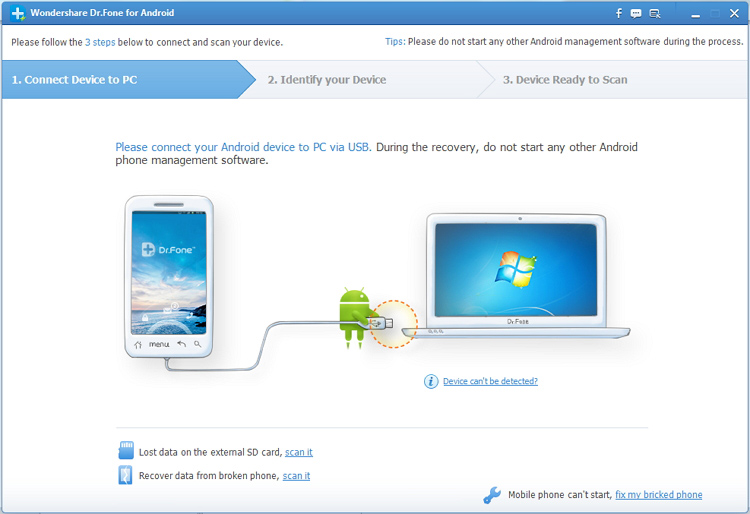
Step 1. Run Dr.Fone for Android and Connect Your Device
 
When download and installation are finished, launch Dr.Fone for Android on your computer and use a USB cable to connect your bricked Samsung Galaxy Note 2 to the computer.
 
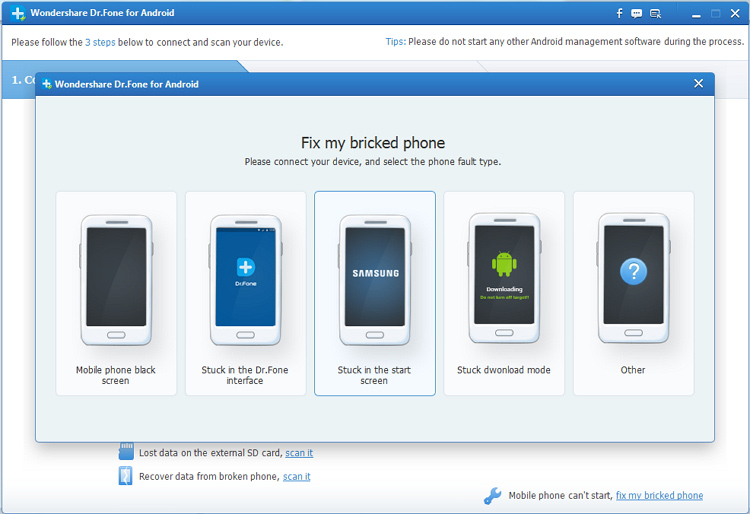
After connection, click “Fix My Bricked Phone” button on the window to begin recovery.


Step 2. Get Your Bricked Device Entered Download Mode
 
You will get pop-up the window as below.

 
You can choose one from the displayed situations to continue.
 
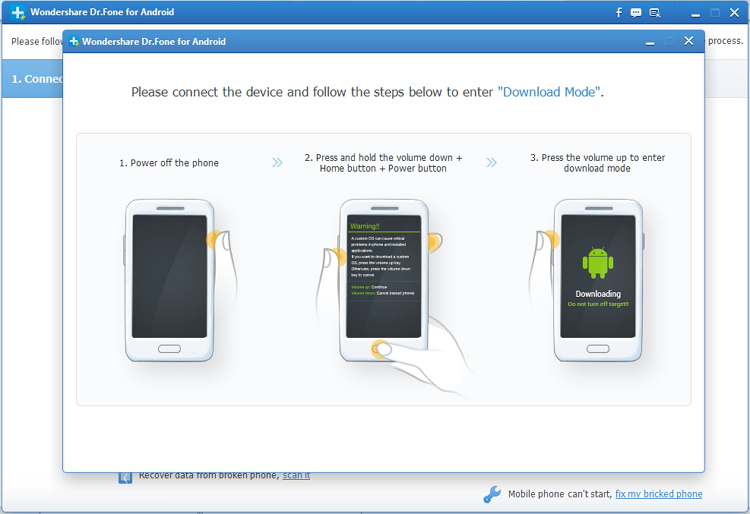
Then the program will ask you get the phone into Download Mode manually. To finish that, you have to firstly turned off your phone. Then hold "Volume Down + Home + Power" on your HTC phone together for a few seconds till the phone enter Download Mode.


Step 3.Detect Your Device
 
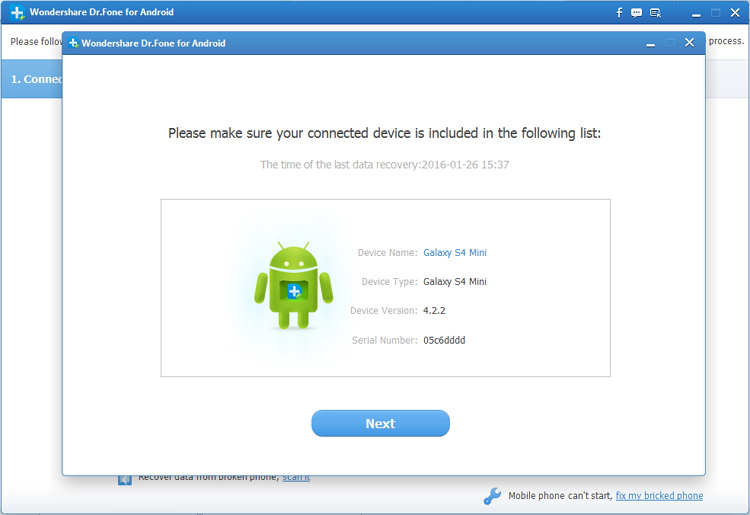
Once your device enters Download Mode, it will be recognized and detected by Dr, Fone automatically and directly.
 
After a while, the details of your phone, such as the device model, Android version etc. will be displayed to you. Please confirm the details.


Step 4. Restart Your Phone to Return Your Phone to Normal State
 
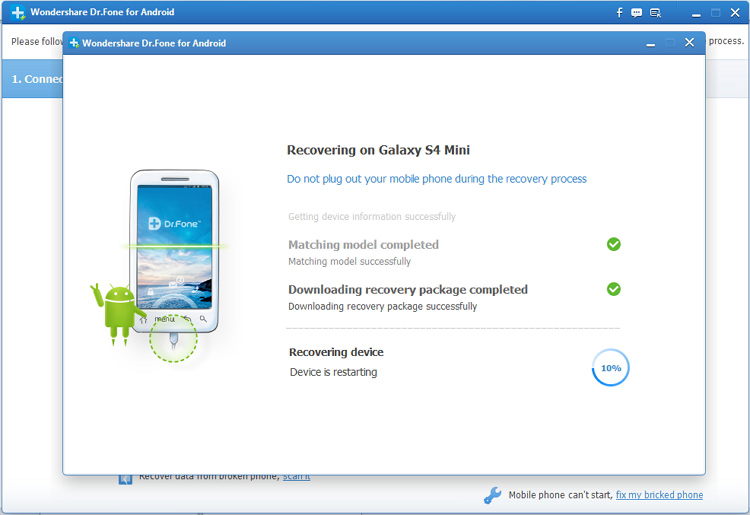
At first, Dr.Fone for Android will download the recovery package automatically, so that it can help you fix the phone and return it to normal state.
 
After download finishes, your bricked phone will restart as a normal one, and then you can access your phone again.

New BQ Aquaris X5 Plus Phone price, feature, full specification, release date By Patricbensen

Click for picture

  • Price USD $255
  • Memory: 16/32 GB& 2/3 GB RAM
  • Display Size: 5.0 inches
  • Processor: Quad-core 1.4 GHz Cortex-A53 & Quad-core 1.8 GHz Cortex-A72
  • Camera: 16 MP Rear & 8 MP Front
  • Battery Type: Non-removable Li-Po 3200 mAh
  • Operating System: Android OS, v6.0.1 (Marshmallow)

Picture of this phone


    Full Specification of BQ Aquaris X5 Plus

    Network 2G, 3G, 4G

    Status

    Announce 2016, July
    Release Available. Released 2016, July

    Price

    BD Price 20,000 Tk
    UK Price 193 GBP
    Canadian Price 335 CAD
    Australian Price 338.5 AUD
    Europe price 310 EUR

    Screen

    Size 5.0 inches
    Resolution 1080 x 1920 pixels
    Type LTPS IPS LCD capacitive touchscreen, 16M colors
    Multitouch Yes
    Protection  Dinorex glass

    Hardware and Software

    Processors Quad-core 1.4 GHz Cortex-A53 & Quad-core 1.8 GHz Cortex-A72
    Chipset Qualcomm MSM8976 Snapdragon 652
    OS Android OS, v6.0.1 (Marshmallow)
    GPU Adreno 510

    Camera

    Back Camera 16 MP, f/2.0, phase detection autofocus, dual-LED (dual tone) flash
    Front Camera 8 MP, f/2.0, 1/4" sensor size
    Feature 1/2.8" sensor size, 1.12 µm pixel size, geo-tagging, touch focus, face detection, panorama, Auto-HDR
    Video 2160p@30fps

    Memory Type

    Internal 16/32 GB
    RAM 2/3 GB 
    Memory Slot Micro-SD Up to 256 GB 

    Connection

    WLAN Wi-Fi 802.11 b/g/n/ac, dual-band, WiFi Direct, hotspot
    Bluetooth v4.0, A2DP
    USB microUSB v2.0
    Radio FM Radio
    GPS & NFC Yes

    Body

    Dimension 145 x 70 x 7.7 mm (5.71 x 2.76 x 0.30 in)
    Weight 145 g (5.11 oz)
    Colors Black, White/Rose Gold
    SIM Dual SIM (Nano-SIM, dual stand-by)

    Sound Type

    Loudspeaker Yes
    3.5 mm jack Yes
    Alert Type Vibration; MP3, WAV ringtones

    Other Feature

    Sensors Fingerprint, accelerometer, gyro, proximity, compass
    Messaging SMS (threaded view), MMS, Email, IM, Push Email
    Browsers HTML5

    Battery

    Type Non-removable Li-Po 3200 mAh battery
    Stand-by
    Talk-time

    New Gionee M6 Plus Android phone price, feature, full specification release date By Patricbensen

    • Price Upcoming
    • Memory: 64/128 GB, 4 GB RAM
    • Display Size:6.0inches 
    • Processor: Quad-core 1.8 GHz Cortex-A53 & quad-core 1.0 GHz Cortex-A53
    • Camera: 16 MP Rear & 8 MP Front
    • Battery Type: Non-removable Li-Po 6020  mAh
    • Operating System: Android OS, v6.0 (Marshmallow)


    Full Specification of Gionee M6 Plus

    Network 2G, 3G, 4G

    Status

    Announce 2016, July
    Release  Exp. release 2016, August

    Screen

    Size 6.0 inches
    Resolution 1080 x 1920 pixels
    Type AMOLED capacitive touchscreen, 16M colors
    Multitouch Yes
    Protection 

    Hardware and Software

    Processors Quad-core 1.8 GHz Cortex-A53 & quad-core 1.0 GHz Cortex-A53
    Chipset Mediatek MT6755 Helio P10
    OS Android 6.0 Marshmallow
    GPU Mali-T860MP2

    Camera

    Back Camera 8 Megapixels
    Front Camera 16 MP, f/1.8, phase detection autofocus, dual-LED flash
    Feature Geo-tagging, touch focus, face/smile detection, panorama, HDR
    Video 1080p@30fps

    Memory Type

    Internal 64/128 GB
    RAM 4 GB
    Memory Slot microSD, up to 256 GB (dedicated slot)

    Connection

    WLAN Wi-Fi 802.11 b/g/n, Wi-Fi Direct, hotspot
    Bluetooth v4.0, A2DP
    USB microUSB v2.0, USB On-The-Go
    Radio FM Radio
    GPS & NFC Yes

    Body

    Dimension 160.5 x 80.6 x 8.2 mm (6.32 x 3.17 x 0.32 in)
    Weight 215 g (7.58 oz)
    Colors Champagne
    SIM Dual SIM (Micro-SIM, dual stand-by)

    Sound Type

    Loudspeaker Yes
    3.5 mm jack Yes
    Alert Type Vibration; MP3, WAV ringtones

    Other Feature

    Sensors Fingerprint, accelerometer, gyro, proximity, compass
    Messaging SMS (threaded view), MMS, Email, IM, Push Email
    Browsers HTML5

    Battery

    Type Non-removable Li-Po 6020  mAh battery