Beranda · · · ·

New Stop Getting Ripped Off By Banks, Dollar Dominated MasterCard Is Now A Must By Patricbensen

The online world is getting more and more robust each day and people are continuously expanding and shifting their offline businesses to the online arena.

Credit/Debit cards have continued to provide one of the best means of transacting online and the growth of credit/debit cards usage is almost proportionally to the recent growth of online businesses.

We understand that the country is currently passing through serious economic crises and the financial institutions even appear the most hit in this economic meltdown.

As we write this now, the country’s currency has been on the dwindle against major foreign currencies of the world, since the prices of crude oil, which is the country’s major foreign exchange earner in the international market have also been on the downward curve from the past 2 years to present.
stop-getting-ripped-off-and-get-dollar-dominated-MasterCard

In the recent and bold move adopted by the Central Bank of Nigeria (CBN) in order to arrest the falling value of its currency, CBN decided to float the Naira as to allow the natural forces of demand and supply take its course at determining the true face value of the country’s currency against other foreign currencies.

Must Read: http://patricbensen.blogspot.com/2013/10/how-to-open-gtbank-domiciliary-account.html" target="_blank">How to open a GTBank domiciliary account

But as it stands now, the Naira floating move handed by CBN seems to be yielding little or no fruit as other factors within the country’s economy and financial sectors continue to play out on the Naira, making the Naira fall appearing unending at the moment.

The implications of all these, which forms the bulk of the topic of discussion today is that the financial institutions in the country (Banks) have craftily hijacked the situation and are now ripping the hell off their customers, by charging them exorbitant exchange rate on Naira to foreign currency exchange transactions.

And the easiest way the banks are achieving this is on transactions made online by their customers with Naira dominated ATM cards (MasterCard/VISA) on foreign sites.

It will beat your imaginations that many online merchants, shoppers and other individuals are recently complaining bitterly on the outrageous exchange rates that these banks have imposed on their Naira ATM cards transactions against foreign currencies.

Recommended: http://patricbensen.blogspot.com/2015/11/why-you-should-use-pre-paid-atm-cards.html" target="_blank">Why you should use Pre-paid ATM cards for most of your online transactions

Recent reports show that the banks now charge somewhere between N430 to N480 per Dollar transaction online with Naira ATM cards, which is even far beyond what the currencies are obtainable in the parallel/black-market section.

As it stands currently, the black-market selling rate of Naira-Dollar transaction is somewhere around N395 to N400 per dollar; meaning that you can presently obtain $1 in the black-market for N400.

If you can confidently walk to the black-market section and buy a Dollar for N400, why on earth do you now have to pay N430 to N480 (Bank rip-off rate) for a Dollar in online transaction with your MasterCard?

The only solution now, to stop the banks rip-off in that manner is to opt for foreign/Dollar currency dominated MasterCard/VISA as against the Naira Dominated Cards.

Also Read: http://patricbensen.blogspot.com/2014/09/how-to-easily-activate-your-atm-card.html" target="_blank">How to easily activate your ATM card for online Quickteller transactions
an
By so doing, it doesn’t even matter again whether you earn in Naira or in foreign currencies, since you will always get a good bargain in buying Dollar at the readily available black-market section than what you will get with the banks.

The idea now after getting your Dollar dominated MasterCard, for those that don’t earn in Dollars; you can easily walk up with your cash in Naira to the black-market, buy your Dollar at N400 and deposit it into your Dollar MasterCard and finally use it for your online transactions instead of paying far above N400 that the banks will charge you.

For those that earn in Dollars, you can equally do the same or even better use your money earned in Dollars to carry out your online transactions without banks outrageous exchanges.

Finally, we have in the past discussed on the http://patricbensen.blogspot.com/2016/02/latest-cost-of-getting-dollar-dominated.html" target="_blank">cost of getting dollar dominated MasterCard/VISA for your online transactions, and the cost still stand the same presently.

New Huawei Y360-U61 Latest Stock Rom Firmware Flash File Free Download By Patricbensen

Download and install Huawei Y360-U61 latest updated firmware flash file directly from here. Huawei Y360-U61 new stock firmware version is released on its official website, Now you can download the latest version of Huawei Y360-U61 firmware from its official download link. 

Huawei Y360-U61 Latest Stock Rom Firmware Flash File Free Download


Huawei Y360-U61 Firmware Detail:

  • Release Date:    2015-7-23
  • Version:            Y360-U61V100R001C328b102
  • File Size:           765.50 MB

How To Install:

  • First of all backup all your important data.
  • Download the zip file from the given official link.
  • Unpack it on your Desktop.
  • Copy the Dload folder to your SD card root directory.
  • Make sure your phone battery is enough charge.
  • Now turn off your phone.
  • Insert SD card.
  • Press both volume keys "Up & Down" and then press power key until the software upgrade progress bar displays.
  • Wait until the progress bar finishes and the phone restart.
  • Check your phone firmware version in setting.
  • Done.


New HUA Box Dongle Latest Version V2.3.2 Full Crack Setup Installer Free Download By Patricbensen

Download and install HUA box dongle software full crack setup installer with high quality & powerful flashing features. It is a great software for flashing and unlocking android smartphones and tablets. Latest version of HUA box dongle software is released by its developers and now it has been avail to download directly from its official download link. You can download HUA  box dongle software full crack setup installer for windows PC for free without paying any fee.

HUA Box Dongle Latest Version V2.3.1 Full Crack Setup Installer Free Download


Before flashing and unlocking your android smartphone or tablet, Don't forgot to get backup of your android data like Messages, Contacts, Photos, Videos. Because after flashing or unlocking your smartphone your all important will deleted and you can't get it again. 

Cool Features:
  • Direct Unlock.
  • Root and Without root.
  • One click IMEI repair.
  • Read, Write and Reset.
  • Security/NVM/QCN.


New Samsung Keyboard or Swype is not working on Samsung Galaxy Alpha [How to Fix] By Patricbensen

Are you having trouble using the Samsung Keyboard or Swype on your Samsung Galaxy Alpha or any other Samsung Galaxy smartphone? This content might be able to help. Read on to learn what you can do should you encounter any problem using the Samsung Keyboard or Swype app on your phone.


Among the possible reasons as to why the Samsung Keyboard or Swype don't work as it should on your device would include (but not limited to) the following:
  • The keyboard is not configured correctly or not set as default.
  • Third-party app is causing conflict.
  • The phone has physical or liquid damage.
  • App Software requires update.
  • Handwriting function is disabled on Samsung Keyboard.
Resolution

As what I usually recommend in my prior posts, the best possible approach in dealing with a device issue is by looking into the possible cause. Try to isolate the problem and determine the underlying cause. So here's what you can do:

1. Ensure there is no physical or liquid damage on the device.

The keyboard may not work properly if a certain component or the phone itself is damaged.

2. Check for app update.

Keeping the software updated is recommended to keep the app optimized. To check for an app update for your keyboard, follow these steps:

  • Go to the Home screen.
  • Press the Menu button.
  • Tap Settings.
  • Select My Device.
  • Tap Language and input.
  • Tap the Settings icon (wheel-shaped image) next to Samsung Keyboard or Swype.
  • Tap Updates.
Or you can also update your device software if needed.

3. Boot into Safe Mode and diagnose.

To eliminate the possibility of a third-party app causing you this trouble, you can try to boot your device into Safe Mode and see if the problem is gone or not. If it's gone, then try to uninstall or temporarily disable any suspected apps or the ones you recently installed.If the problem persists, proceed to the next method.

4. Define which keyboard is set to be the default input method on your device.

Here's how to check:

  • Press the Menu button from the Home screen.
  • Tap Settings.
  • Tap My Device.
  • Select Language and Input.
  • Tap Default
Note: The default keyboard must be set to Samsung Keyboard or Swype.
  • If not, then select the input method you desire.
  • Restart your phone.

After the restart, test to see if the Samsung keyboard or Swype app is already working fine on your device.


New Would You Rock This Runbo F1 Military Design Waterproof Smartphone For N134,750? By Patricbensen

We saw this smartphone called Runbo on Jumia platform, and it goes for N134,750 over there.

The device is a 5.5inches smartphone with a FHD 1920 X 1080 pixel display resolution.

Runbo smartphone is built with military design and it is waterproof.

It came with 1.5GHz octa core MediaTek processor, 16GB internal storage and 2GB RAM.
Runbo F1

The back and front cameras are 13MP and 5MP and the back is packed with 5000mAh battery capacity.

Runbo F1 runs on Android 5.0 Lollipop OS and it came with a big screwdriver as part of the accessories.

Currently, the device is available and listed on Jumia for the above mentioned price.

No the big question is; would you rock this military design and waterproof device for such an amount?

New How to Install Pokemon Go On Lower Android Versions By Patricbensen

If you want to play Pokemon Go on your Android phone below 4.4 version it will display an error saying "parse error there was a problem parsing the package", and hence using some hack solves the purpose. 

I personally tested it on my Xperia Z phone which has Android 4.2.2 and it really works. 

Follow these steps prior to installing your new Pokemon Go.

Before you start Modding the OS, try to sideload the app. If it still shows parse error, modify the APK file or re-download it. 

image credit: pokemon.com
Now Download any apktool. Take your framework-res.apk from /system/framework and install it via apktool. Decompile the APK file.

Open androidmanifest.xml with Notepad++ add the tag 
<uses-sdk android:minSdkVersion="14"> in androidmanifest.xml. 

If it still does't work, add targetSdkVersion tag like this,
<uses-sdk android:minSdkVersion="14" android:targetSdkVersion="23"> 

[SDK 14 is Android 4.0.4 and SDK 23 is Android 6.0.1. ]

Still need help visit Android Developer Site here.

Re-compile the APK and sign it. Alternatively here is a link which will help you install Pokemon Go on any Android Device. Thanks to OmegaMediaGroup

Click here and Download. Pokemon GO_0.31.0 Any_Android_Version.apk

New Nokia BB5 Easy Service Tool (Infinity) Best Dongle Setup Free (Official) Download By Patricbensen

BB5 easy service tool infinity best dongle setup new installer free official download for windows. Infinity BB5 easy service tool for mobile flashing and unlocking best software new setup installer is released at its official website and it has been avail to download for windows. If you want to download BB5 easy service tool full setup installer for windows then follow the provided official download link to download this great tool for mobiles.
BB5 Easy Service Tool (Infinity) Best Software Free (Official) Download 

BB5 Easy Service Tool (Infinity) Best Software Free (Official) Download

This setup exe for BB5 easy service tool is new version of this software and you can download it from its official website. Offciail downloading link is given at the end of below. You can download this great serviceing tool for mobiles by clicking or following the download link below. Click below downloading link to start downloading this tool now.

New Etisalat 1GB For N200 Night Data Plan By Patricbensen

Etisalat has joined the rest of other networks to unleash their own cheap night data plan of 1GB for N200.

Though considering the price and the amount of data that other networks offer for their night data plans, we initially don’t want to call this particular Etisalat night plan cheap, but maybe to Etisalat 1GB for N200 is cheap and hence we also joined them to call it cheap.

Etisalat has been known to be the network provider with the costliest data subscription plans, and they have gone ahead to show that again in this their latest night data plan offer.
Etisalat-1GB-for-N200-night-data-plan

While other networks are offering even more data for lesser amount night data bundle plans, Etisalat says that theirs is 1GB for N200.

And the funniest is that while subscribers on other networks have been enjoying cheap night data plans long before now, Etisalat is just waking up from slumber with theirs.

Remember MTN has http://patricbensen.blogspot.com/2016/06/my-mtn-night-data-plan-of-n25-for-500mb.html" target="_blank">N25 for 500MB night data plan, Airtel recently launched http://patricbensen.blogspot.com/2016/07/how-to-subscribe-to-airtel-15gb-for-n50.html" target="_blank">N50 for 1.5GB night data plan.

Although that of Glo night data plan is also 1GB for N200, but we can pardon Glo on that for offering the most affordable 24/7 data plans.

Must Read: http://patricbensen.blogspot.com/2016/07/etisalat-could-eventually-turn-out-most.html" target="_blank">Etisalat could eventually turn out to become the worst browsing network, see why

Well, if you are interested in the Etisalat new data plan on the bases that you see it as the fastest browsing network in your current location, you can subscribe to the Etisalat 1GB for N200 night data plan by recharging with N200 and by  dialling the subscription code *229*3*11#

It is a one day data plan valid from from 12midnight to 5AM same day.

On your own do you think that Etisalat did real justice by disguising to be in competition with this their newly launched night data plan? And why is it that Etislat always come last in these types of offers?

New How to fix No Service Error, other signal issues with your Samsung Galaxy Note 5 and other Galaxy smartphones By Patricbensen

This post contains standard troubleshooting procedures and workarounds used to fix 'No Service,''No Signal' error and other signal problems you may encounter with your Samsung Galaxy handset such as the Galaxy S4, S5, S6, S6 Edge, S6 Edge Plus, Note 4, and Note 5. These methods are also applicable to other Galaxy variants including the Galaxy Alpha, Galaxy Tabs and Galaxy A3.

Note: Menu settings and options may vary depending on the carrier and OS platform the phone is running on.


Signal issues like No Service, Emergency calls only, or No Signal errors are often due to several factors including network outage, bad SIM card, incorrect settings, or hardware damage on the device. Other cases of No Signal or No Service problem are tied to some environmental factors like location signal barriers. Other possible interference include third-party casing or accessories. Another thing you have to consider as a potential culprit is a third-party app that may be causing conflict to your phone's network functionality.

The best way to fix the problem is by looking into the possible causes beforehand.  This means you need to think back of what has happened before the problem instigates. For example, did your phone shows No Service or No Signal all of a sudden, after downloading or installing an app, and the like. This way, it would be easier for you to isolate the problem and determine the underlying cause.

Troubleshooting Procedures

Step 1. Check for network outage.

The first thing to do is the your phone suddenly shows No Signal, No Service, or other signal errors is to check for possible network outage. In this regard, contact your Internet Service Provider or network service carrier to verify if there are any outages affecting network services in your location. In case you are getting poor signal or no reception in specific locations verify with your carrier about their current network coverage.

Step 2. Verify account status.

Generally, carriers will temporarily disable your services if your account is bad standing. For example, you may have failed to pay your previous bills for some reasons and this has resulted to your account being placed in an inactive status. In this case, contact your carrier and settle your accountability to resume services.

Step 3. Verify the SIM card.

Sometimes, it may be a bad SIM card that is causing you this trouble. It could be that the SIM card is loose or damaged and needs to be replaced. To determine if the SIM card is fine, try to remove the SIM card from your device and then re-insert it. Make sure it's properly placed into the SIM card tray and that it's secured. Just be sure to power off your phone completely before you remove the SIM card.

For further assistance in SIM card testing, please contact your carrier. Or you can also try to exchange SIM cards between the devices if you have another device using the same network. This will help you know whether or not the SIM card is damaged.

If you've just switched to another carrier and kept using the same phone, and then it's showing No Service, No Signal, or Emergency calls only, then you need to contact your previous carrier for a SIM unlock. Usually, your device needs to be reprogrammed by your current carrier to activate their service.

Step 4. Soft reset or reboot.

A soft reset often helps in fixing device issues caused by minor software bugs or system glitches. That said, perform a soft reset or simply reboot your device.

Step 5. Check your network settings.

Make sure Airplane mode is not activated. Disable Airplane Mode, if needed. To check, open the Quick Settings and locate the Airplane Mode switch. To launch the Quick Settings, swipe down from the top of the screen. Toggle the Airplane Mode on and off and see if there are any changes afterwards.

Step 6: Verify Mobile Network settings and manually search for available networks.

Make sure Mobile data is enabled on your device. Go to Settings-> Mobile networks-> tap on Network Mode, and then select WCDMA/GSM (auto connect) option. Next, select Network operators and tap on Search networks. Allow your phone to scan for available network. Once the search is complete, select your carrier from the list and restart your device.

Step 7. Boot your phone into Safe Mode.

If the problem occurs after installing a new app, there's a higher chance that the problem is triggered by the app. To determine whether it's due to faulty third-party app or not, boot your device into Safe Mode and diagnose your phone. To boot into Safe Mode, follow these steps:

  • Power off your phone.
  • Hold the Volume Down while powering your phone back on.
  • Once the phone has booted up in Safe Mode completely, try to make a test call.
If it works just fine, then you may need to consider disabling or uninstalling downloaded apps.

Step 7. Hard Reset/Master Reset/Factory Reset

If your device is still unable to get a signal or network service after performing all prior troubleshooting methods, then your last resort would be a hard reset. The process will reset your phone to factory defaults, which means losing all your personal information from the phone including photos, contacts, apps, and documents. That said, be sure to backup all your important contents before you begin. Once you're all set, follow these steps:
  • Tap Apps from a Home screen.
  • Tap Settings.
  • Tap Backup and Reset.
  • Tap to select Factory Data Reset.
  • Follow the onscreen instructions to complete the reset process.
Your phone will then reboot and you'll to go through the initial setup.

Other Helpful Workarounds:

  • Remove any third-party accessories or casing. Third-party accessories are not schemed as that with the OEM's. So there's a higher chances that they wouldn't fit with your device even though they are usable. To isolate the problem, try to remove any third-party casing and see if there are any changes without them on your device.
  • Ensure your phone is running the latest Android software version. This will help you optimize your device. Also, software updates also contain fix patches to certain bugs or software glitches. 
  • Check your device for any possible damage (liquid or physical damage). Your Samsung smartphone is designed with a Liquid Damage Indicator (LDI) located on the battery and in the battery compartment. The LDI should appear in solid white, or white with pink or purple Xs. Other than that color denotes a potential damage to certain components on your device, which resulted to the No Service or other signal problems you are experiencing. In this regard, you can set up an appointment with an authorized Samsung technician to check your device and repair if needed. 
Contact your carrier or network provider if you are getting other SIM card errors and that you are unable to connect to your carrier's network.


New Ultimate Ways to Make Money with Your WhatsApp By Patricbensen

WhatsApp is growing even faster. With it, there are opportunities for people to make some money with link sharing and promoting without many efforts.

As per reports from Investopedia, WhatsApp has a potential to make $1.47 to 2.77 Billion per year by adopting the competition's monetization policies. So, why can't we look some share for us as well? Below are some well-known methods to do so.

Using Link-Shortening Services

Every time a shortened link is clicked, a user will see an ad for some time and then directed to an actual site, after it an advertiser will pay you a certain money. It's that simple!

Once you sign up with such link shortening service, you will get options to promote content with shortened links. That's all, start sharing them and earn money.

It is similar to twitter. Describe what link is all about and why someone will spot click on it to see viral content. It could be gifts, tech. gadgets, e-products etc. there are advertisers everywhere.
Most of the high-paid advertisers are from US, UK, Germany and so, you may look at them first.

Join some of the highest paying Link shortening services here and share with WhatsApp Groups/Broadcasts

Shorte.st - It is highest paying shortened link promotion service currently in the market. Just short your link and share them on your social profiles including WhatsApp. Shorte.st will pay you $10.88 per 1000 visits to shortened links.

Ouo.io - It guarantees minimum $1.5 per 1000 visits and even possible $5 per 1000 visits. You can get your payouts via Paypal & Payoneer.

Adf.ly - It is another URL shortener service with attractive pay per view. Adf.ly will pay you $9 per 1000 visits and almost up to 20% on referral commission.

LinkShrink - Will pay you up to 6$ per 1000 visits and can be withdrawn using Paypal and Payza.

Bc.vc - Earn up to $5 per 1000 visits and also earn 20% commission from your referrals.

Blv.me - It is a CPA and Link locking based ad network and pays on user action rather than just view/impression. For every lead user generates, they will pay you max. up to $10. Sound's fascinating. Just go ahead and join.

ad7.biz - One of the highest paying option. Earn up to $6 per 1000 views. Also earn 20% commission on referrals. 

Linkbucks - One of the highest paying URL shortener. Almost over 13 years in the business, Linkbucks offer from $3 to $6 per 1000 views. One can even earn up to $10 for single unlock for downloads through shortened links.

Gca.sh - It is new in the market. Will pay you $2 to $5 per 1000 views. Payment transfer includes Paypal and Wire transfer.

Adyou.me - $3 per 1000 views. You can also make around 20% commission for referrals generated. Its payment options include Paypal, Payoneer, Payza, Skrill, Webmoney and WireTransfer.

Warning, please note you can not use shortened note on all your blog posts, it is harmful and creates issues such as 'problem with requested link error', 'bad effect on your CTR', 'could hurt your business', 'issues with plug-ins and affiliate network settings'.

For your business purpose, you can easily Cloak your links through Domain Redirects and HTML Redirects and retain full control over links. Using a healthy domain manager such as GoDaddy you can easily redirect your affiliate links. It is super easy. For more see this.

Affiliate Marketing

Affiliate is one of the proven fastest ways to earn a commission on sales. People often fear about Affiliate as it seems difficult and blindly believe that 90% or more commissions are gained by top tier sites. Although it is true, with your sales pitch and great content you can actually achieve a great target. 

If you promote such content through WhatsApp, advertisers will surely give your benefits.

Amazon is probably the best affiliate program to start with. For this content must have good traffic and you must be able to promote it faster. 

An attractive description will attract visitors to go to the links and buy products. So, look for best paying affiliate which will suite your friends and WhatsApp network and start promoting. 

Also see, "Amazon Affiliate Program may suit best to you"

PPD Networks

Similar link sharing method, in which you will be paid once someone downloads through your promoted links. PPD stands for Pay Per Download. 

But before one start downloading, they will be asked to complete a small survey or task.

Click here to explore best PPD Networks available to start.

Countries such as USA, UK pay highest for their downloads, so look for them instantly and start earning. 

More people on your WhatsApp list means more you can reach deeply with your link promotion. So start growing your group members before firing your new  plan.

Also see "WhatsApp Tips & Tricks constantly Updated"

Business Ideas ...

Siddarth Nair (Asst. Vp at Tech Mahindra) explains a potential marketing plan for WhatsApp for making money. One of it includes creating Transaction Platform. In this retailers can open up communities where interested users can join. Best examples would be Amazon, Flipkart etc. Users will only get updates from the products they might be interested in. They will click on them and proceed to close the transaction if needed. 


Faster Recruitment - Recruiters can now look for employees data on social sites easily and can communicate instantly with platforms such as WhatsApp call. Once a user is interested in a job posting, they will have the option to take the communication further using WhatsApp platform.

You may also like "Amazing Ways to Earn Money with Your Android Smartphone"

New Does Airtel Special Privilege Data Plan Of 6GB For N1,500 Zaps Data? By Patricbensen

Recently, airtel launched the http://patricbensen.blogspot.com/2016/08/get-airtel-6gb-for-n1500-in-latest.html" target="_blank">special privilege data plan that offers 6GB for N1,500 monthly data.

And as we mentioned earlier, the new Airtel special privilege data plan is actually the blackberry unlimited data plan of 3GB that was doubled to 6GB and that works on all devices without any special settings.

But we believe that since the blackberry unlimited data plan was formerly and highly notorious for data zapping when used on non-blackberry devices, many of you out there will also want to know whether airtel is still using their malfunctioned data consumption calculator to calculate this new offer; i.e. on whether the special privilege data offer zaps data?
find-out-whether-the-new-airtel-6GB-ror-N1500-zaps-data
Well we will like to start by giving you some cheering news concerning data zapping on the newly introduced Airtel special privilege data offer of 6GB for N1,500 by assuring you that we are currently using the new data plan on our android device, and we have not noticed any form of data zapping of any form as the data deduction appears very normal.

However, there appears a little twist of fate on this new airtel special privilege data offer as we noticed that just as usual with Airtel, the plan is SIM selective.

Must Read: http://patricbensen.blogspot.com/2016/08/why-are-you-not-sharing-glo-cheap-and.html" target="_blank">Why are you not sharing the Glo heavy duty data to even get them cheaper?

Therefore, in order to avoid stories that touch, it is important for you to test out your SIM eligibility status with N0.0 first before going ahead with the subscription.

To do so, simply use your Airtel SIM without airtime to dial the subscription code, which is *440*161# and if you get insufficient credit reply, then you should know that your SIM is eligible and you can then go ahead to subscribe.

Remember you can check your data balance at any time by dialling *123*9#

Let the data price keep on dropping until the day you all can subscribe for 10GB for N1,000.

New Why Are You Not Sharing Glo Cheap And Heavy Duty Data To Even Get It Cheaper? By Patricbensen

We all know that when it comes to data dishing, Glo amongst the other networks appears to be more generous.

Now taking a careful look at the current Glo monthly data plans as given below

N1,000 for 2GB

N2,000 for 6GB

N2,500 for 10GB

N3,000 for 12GB

N4,000 for 18GB

N5,000 for 24GB

N8,000 for 48GB

N15,000 for 60GB

N18,000 for 90GB

With the Glo data share service, at least to or 3 Glo subscribers can decide to pull resources together and even get this data cheaper per head.
share-Glo-data-and-even-get-it-cheaper

For example if Mr A has N1,000 and needs about 3 to 4GB data, which ordinarily no network in the country presently has been generous enough to offer 4GB for N1,000 monthly data; now, what Mr A should do is to look for his friends, maybe 2 of them that also have N1,000 and are will to buy monthly data.

Mr A should now introduce the idea to his 2 of pulling resources together to go for Glo N3,000 for 12GB monthly, where each of them will contribute their N1,000 each.

After Mr A has collected the fund and subscribed for the data, he can now add the 2 of his friends’ number to partake in sharing and using the 12GB.

Must Read: http://patricbensen.blogspot.com/2016/07/airtel-reduces-validity-period-for-n200.html" target="_blank">Airtel reduces validity period of its 2G network data plans

Yes the data cannot be gifted as all of them will only have the opportunity to use the data normally from the 12GB bulk as if they subscribed individually, irrespective of their locations and on Whether Mr A phone is off.

Since the 3 parties are all good friends, they will most likely not be shellfish on using the data, and will almost use it equally to the duration of the data’s validity period.

Similar sharing formula can be done on any of those monthly data given above; and you can just decide to share with only a 2nd party and both of you will bear the cost.

Don’t you think by so doing, you will end up paying less and getting more data especially in this period of serious economic meltdown?

To add Glo number for data sharing is very easy, all you need to is to dial *127*01*GloNumber#

You can repeat the process to add another number.

To remove a number dial *127*02*GloNumberToRemove# and that is all.

By adopting this sharing formula, we believe that you can always enjoy cheaper Glo data with friends and families.

New Google Apps for Work - Get your Own Company Email using Gmail By Patricbensen

It's pretty easier now to have your own business email rather than just a Gmail or yahoo one. Especially when you are running your own website or blog. This will certainly advertise your website or brand through your communications as well and certainly increase brand value. The way I did recently to create my own emails address as mathew@patricbensen.blogspot.com was not that difficult. You can also create a group email. 

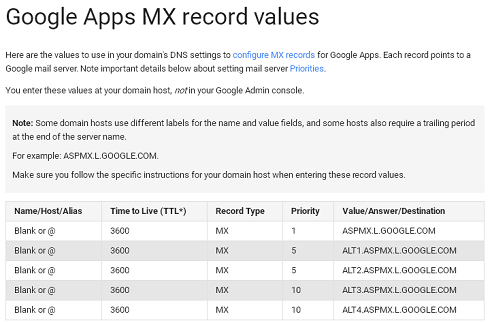
Google Apps provide easy email setup where you can create your own username followed by your domain. Then all you need to do is to setup your MX records to use your own email with Gmail. It does not use POP to collect your mail but initiates your emails to arrive at personal domains and utilize Google's servers. 


Even though most of the web hosts provide email account with their domain, most of the time handling them is a headache. Why? Thy will force you to use a client on your computer or you will need to setup a mail forwarding system which is again cumbersome. The best solution is to use the world's fastest Google Servers with their free Apps.


Getting Your Own Domain 


To get a domain name, which will be your own 'example.com' you need domain hosting plan. You can register the domain with a domain registrar, such as Dreamhost, 1&1, GoDaddy, Name etc. See here "select custom web hosting"


Most DNS registrars will give your DNS servers (such as Namecheap) but you can also go for some better options such as Google (Partnering with GoDaddy and eNOM).


There you will need to edit the MX Records and CNAME Records on domain setting page. 


MX Records specifies which mail server is going to be used by your new domain and CNAME records plays the role as to access the webmail and other Google services.

Setting up Google Apps for Business


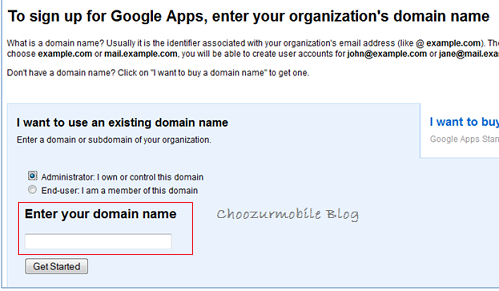
Sign up on Google Apps for Business here. (Don't worry you don't have to pay here). You can use your current running Gmail email. Next is to enter your domain carefully on which you want to create your new email. 


You may also like "How to choose best Domain for your new business website?"


Once you complete the sign-up a process, next is to setup you account information. This will be your own new email address. Once complete, you will finish the process and have Google Apps account registered with your own email just created.


On the admin control panel, you will be asked to confirm your own domain authority. Just select the box to complete the process.


Verify your Domain Ownership


Once you click on "Confirm that you own the domain" you will be taken to a page that includes HTML verification file. You need to upload this file to your web server. 


All you need is an FTP access on your web domain server for uploading this file. (If you are new here See how to use a free FTP client. 


Upload this file to publically accessible folder. (Very Important)


Now open this file in a browser to ensure that it is uploaded properly. It will say google-site-verification blah blah... There you are.


Once complete, you will be notified with message that 'your domain was successfully verified'


Another way to confirm your ownership is to add Meta Tags to your Site


You can also add meta tags to your site. For WordPress, you can open the theme editor, find header and put the meta tag on the top.

Other method includes creating TXT record on your DNS. From your Domain Setting panel go to cPanel and choose Advanced DNS Zone Editor and enter txt data provided by Google.

Ensure the entry at the bottom of DNS record.Once Completed, you will get a congratulations message.

Using Mail Exchange Program

This will ensure a new mail will be directed from your new domain to Google servers. If you don't do this properly your emails will be stuck at your web host and will not arrive at Google Apps.

Most of the web hosts use c-Panel. (you will need to go to your site settings depending upon your hosts to edit MX records)


Just go to www.patricbensen.blogspot.com/cpanel. Contact your web host service center, if you forget the login information. 


Now click on MX Entry icon and look for a domain in a drop down menu. The first option is Email Routing. Select Remote Mail Exchanger, scroll down and select value '1' in Priority field and ASPMX.L.GOOGLE.COM in Destination field. Now click on Add New record. 


Edit your existing MX Record to Priority value to 15 by, for this click Edit in Actions menu. This completes the procedure.


To confirm, send and test email to your Google App email. 


Notes: If you are not using cPanel, all you need to do is to find your MX recorders settings and its editing method. Enter MX records as per Google Apps records. And edit default MX priority to be deleted or to have a higher number as we done above. It is preferred to change the value so that if your want to enable it again it would be easy. 


Editing MX values with your web host panel could be a tricky part. You can have easy chat with your current host provider online to know instantly what to enter and save.